Turn on suggestions
Auto-suggest helps you quickly narrow down your search results by suggesting possible matches as you type.
Showing results for
Get 50% OFF QuickBooks for 3 months*
Buy nowI found 4 balance equity entries dated TODAY 12/10/2022.
I did not deactivate these 4 accounts. Their balances were transferred to equity. 3 were small employee loans,
1 was a prepaid Federal Income Tax account.
but what is going on? I didn't delete the accounts today. Didn't touch them today.
I certainly wouldn't delete a prepaid income tax account on purpose.
In any case, I made new accounts and transferred the old balances to the new accounts
and made the old accounts inactive. But now I used up 4 of my limited number of accounts.
The audit says I made the entry today at 3:45pm,
while the comments say "Created by QB Online to adjust balance for deletion".
So that already is inconsistent.

Let's get this sorted out, fbcooper.
To narrow down the issue, we can look into who deactivated the accounts through the Audit Log. Here's how
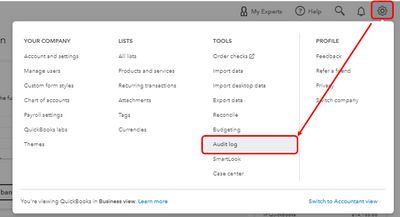
If there's no one made the account inactive, we can use some basic troubleshooting steps. To begin, press F5 on your keyboard to refresh the page.
If the problem persists, we can open your QuickBooks Online account in a separate window. Here's how it's done:
Once signed in, go back to your chart of accounts and check your data from there. If it rectifies the issue, go back to your main portal and clear its cache to remove the browser's history or you can press CTRL+Shift and Delete keys on your keyboard altogether. You may also try accessing your account using another supported browser.
If you continue to get the same result, I'd recommend reaching out to our QuickBooks Support. Unlike in this public forum, they have the tools required to create a ticket whenever necessary on your behalf.
More information about the chart of accounts in QuickBooks Online can be found in the articles listed below. This article describes the default accounts that cannot be deleted, as well as how to add sub-accounts:
Manage default and special accounts in your chart of accounts.
Create subaccounts in your chart of accounts in QuickBooks Online.
Please let us know if you have any further concerns. We're always happy to help, fbcooper. Have a nice day.
Thank you for the reply - the audit said I deleted the accounts today.
But the description said it was done by QB to delete the account.
I don't know how to delete an account from the chart of accounts.
I certainly didn't see any message that I was deleting 4 accounts - all sub accounts .
The account names were all changed to add (Deleted Account) which shows up on my Balance Sheet for last year,
but of course were missing from 2022.
Thanks for following the steps shared by my peer, @fbcooper. We never see this coming.
I've checked our records but couldn't find any reported issues similar to this. Since you're done with all the basic troubleshooting without luck, I'd recommend contacting our Customer Care team.
You can securely share your screen with us to help you check what's causing this to happen and help you fix it. They can also submit a request to investigate the issue to our engineers whenever necessary.
Here's how to contact us:
For future reference, check out this article to learn more about inactivate and reactivate your accounts in QuickBooks Online.
Keep in touch if you have additional concerns with managing your chart of accounts. Take care!


You have clicked a link to a site outside of the QuickBooks or ProFile Communities. By clicking "Continue", you will leave the community and be taken to that site instead.
For more information visit our Security Center or to report suspicious websites you can contact us here


