Get 50% OFF QuickBooks for 3 months*
cancel
Showing results for 
Search instead for 
Did you mean: 
Announcements
Simplify payday and set payroll to run automatically on QuickBooks. Explore QuickBooks Payroll
chirob
Level 1

Does anyone know how to make the default from "Save and New" to "Save and Close" on the Receive Payment button in an Invoice?

I've created an invoice and want to receive payment from the invoice. Currently, the default is set to "Save and new". I would like the default to be "Save and close". How do I do that? I've already cleared cookies and cache, closed and restarted the browser (Chrome). Nothing has worked. Does anyone have any other ideas?
1 Comment 1
Charies_M
Moderator

Does anyone know how to make the default from "Save and New" to "Save and Close" on the Receive Payment button in an Invoice?

Hello there, chirob.


Normally, the default setting when finishing a Receive Payment transaction is Save and close. If not, you'll want to perform some basic browser troubleshooting in which you already did to no avail.


In this case, I suggest contacting our QuickBooks Care Support for further investigation. They have tools to help identify the cause of this behavior and come up with a fix.


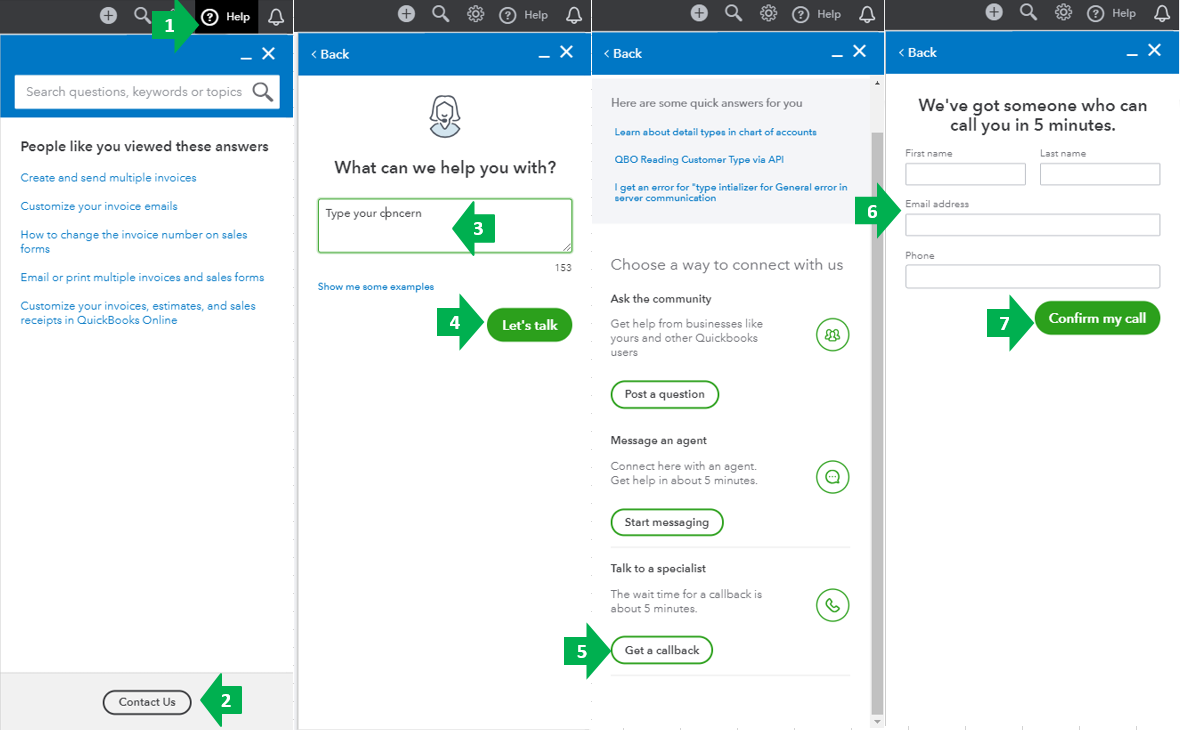
Here's how to reach us:

  1. Go to the Help menu at the upper right.
  2. Select Contact Us.
  3. Enter your concern.
  4. Click Let’s talk.
  5. Choose Get a callback
  6. Type in your contact info.
  7. Select Confirm my call.


You can check out this article for our most updated contact information: Support hours and types.


Here's an article you might find helpful when receiving payments: Record invoice payments in QuickBooks Online.


I’m looking forward to the success in getting back the Save and close default. I’ll be right here anytime you have other concerns. Have a good one.

Need QuickBooks guidance?
Log in to access expert advice and community support instantly.

Need to get in touch?

Contact us