Let's team up to ensure you can avoid duplicate numbers, Pandora.
Before anything else, could you clarify if your mention of QuickBooks warning about duplicate numbers from 2011 refers to an existing invoice from that year matching the one you're creating this month? If so, I recommend selecting a different invoice number.
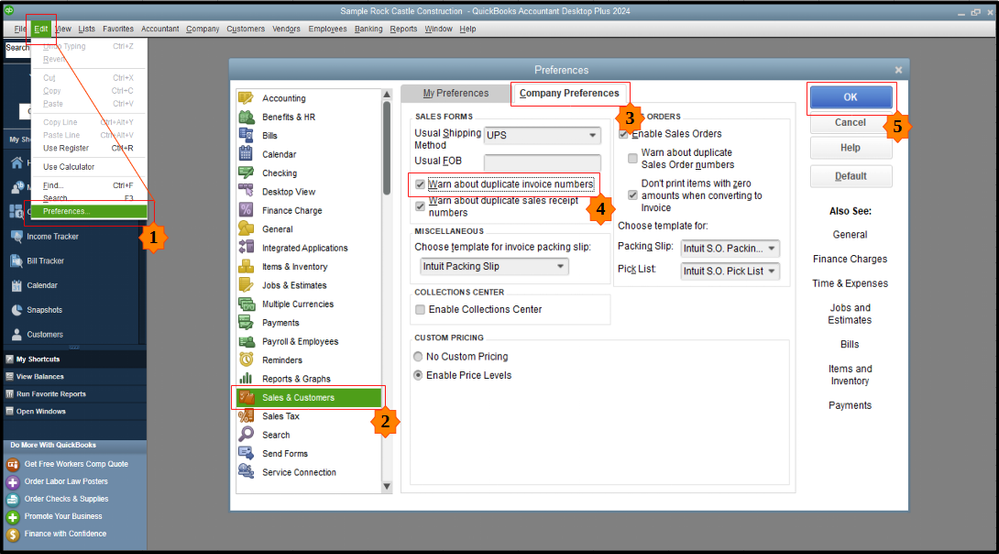
Now, you'll have to configure QuickBooks to alert you when it detects duplicate transaction numbers. Here’s how:
- Locate to the Edit menu and choose Preferences.
- Click Sales & Customers.
- Select Company Preferences.
- Then, check the Warn about duplicate invoice numbers checkbox.
- Once done, hit OK.
However, if you meant something different, can you share more details about it? This will help us clarify the situation and assist you more effectively.
Additionally, record invoice payments directly to track customer payments and maintain accurate records.
If you have any questions about managing your invoices or other QuickBooks concerns, let us know in the comments below.




