Turn on suggestions
Auto-suggest helps you quickly narrow down your search results by suggesting possible matches as you type.
Showing results for
Get 50% OFF QuickBooks for 3 months*
Buy now
Hello there. Let's work together to fix your declined transactions in QuickBooks Online (QBO) and mark the invoice as unpaid.
Payment transactions decline due to incorrect card details or insufficient funds. Here's how to handle this issue to keep your books accurate.
First, identify the rejected payment and take note of the payment details. To do that, go to + New and select Bank Deposit. It will show all the undeposited payments.
Then, create a service item to track the rejected bank transfer. Once done, create a new invoice and remove the payment from the original invoice. Please see these steps:
Once done, you can move the payment to the new invoice. I'll share this article for the full detailed process: Fix a rejected bank transfer payment in QuickBooks Online.
You may also refer to this link for additional steps you can take for declined credit card payments: Fix customer's declined credit card payments.
Furthermore, you'll want to set up autopay for recurring credit card payments in QBO. Here's a guide for more information: Recurring Credit Card Payment FAQs.
We'd love to hear from you if you have other questions or concerns about declined payments in QBO. The Community is open anytime to assist. Take care.
This seems ridiculously complicated. Can I simply remove the payment, that never went through, therefore isn't even a transaction that exist? I don't want to issue credits, track against services, create new invoices. I simply want to remove a rejected transaction that QBO shows as paid, even though the system itself did not process it because it was rejected. How do we accomplish this in less steps so that you guys can keep taking my money in the form of transaction fees and I can spend less time doing this?
I understand the importance of removing the rejected invoice payment directly. Let's go over some details so you can achieve the task in QuickBooks Online (QBO).
Instead of following the steps provided by my peer above, you can simply unlink the rejected payment and delete it. Here's how:
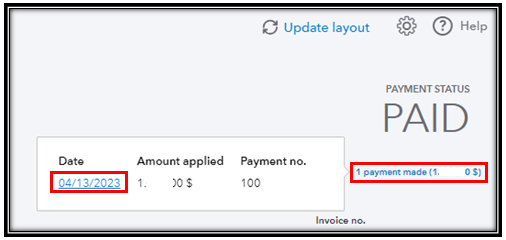
Moreover, I'm adding this article in case you might need to void or refund future payments so your accounting stays accurate: Void or refund customer payments in QuickBooks Online.
Reach back out to me by commenting below if you have any questions about removing a rejected payment in QuickBooks. I'm always here to help.
That worked like a charm. Thank you very much.
We appreciate you for coming back.
Thank you very much! I appreciate you taking the time to let us know that my colleague's solution was able to assist you. I also commend you for following the suggestions and utilizing all of your resources to arrive at the solution you have now.
As always, the Community is brimming with professionals who are knowledgeable in every aspect of QuickBooks, so please don't hesitate to contact us here if you have any questions. We're always happy to assist you on your way to victory. I wish you and your company continued success!


You have clicked a link to a site outside of the QuickBooks or ProFile Communities. By clicking "Continue", you will leave the community and be taken to that site instead.
For more information visit our Security Center or to report suspicious websites you can contact us here


