Turn on suggestions
Auto-suggest helps you quickly narrow down your search results by suggesting possible matches as you type.
Showing results for
Get 50% OFF QuickBooks for 3 months*
Buy now
Hi foothillshvacr,
I want to ensure that the information I'll be providing matches with what you're currently experiencing. Can you tell me the type of device you use? I also appreciate it if you could send a screenshot of the interface you're seeing.
I'll keep an eye on your response.
I have also experienced this. I have checked my invoice/estimate format in the browser page but nothing is changed, however, it was brought to my attention by customers that none of my items are broken down to show quantity and individual prices before line totals. it is only showing item quantity and lump total when invoices and estimates are sent through the mobile app. Additionally, it now shows my item description and part numbers in the estimates/invoices, as it hadn't before.
another issue, before the update was any default text/notes i had included on the forms does not appear when i create an invoice/estimate on my mobile.
I can share some troubleshooting procedures that can help fix the issue of missing details on the invoice page when using the QuickBooks Online mobile app, @TannersLock.
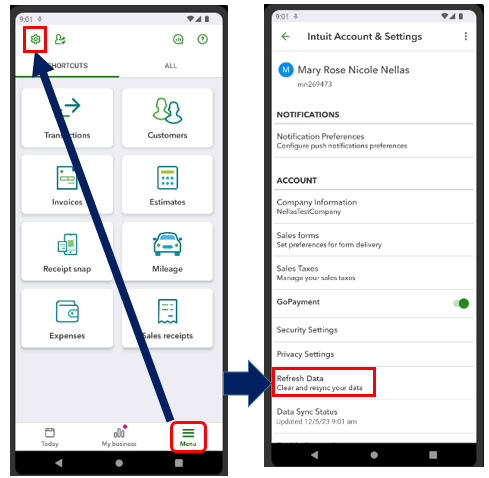
Typically, when you input notes on the sales form, they should show up when creating an invoice or estimate whether through the browser or mobile app. In your case, I suggest refreshing the app's data to sync them manually. This process plays the same role as clearing the cache from your web browser. Both collect files to save time when loading repetitive data and images.
Here's how to do it if you're using Android:
For iOS:
If the issue remains, let's uninstall and reinstall the application to start fresh.
Moreover, you may visit this article to learn which QuickBooks Online mobile app features are supported on mobile devices: Compare mobile app features.
Keep me updated about the result or if you have further difficulties creating invoices and estimates in your QBO mobile app. Leave a reply below and I'll be sure to get back right away.


You have clicked a link to a site outside of the QuickBooks or ProFile Communities. By clicking "Continue", you will leave the community and be taken to that site instead.
For more information visit our Security Center or to report suspicious websites you can contact us here


