Get 50% OFF QuickBooks for 3 months*

Buy now
cancel
Showing results for 
Search instead for 
Did you mean: 
Announcements
info892
Level 1

How can I delete a sub-account expense in Quickbooks 2019 Desktop Pro within the Chart of Accounts, if it is used in a transaction and/or has a balance?

 
1 Comment 1
LieraMarie_A
QuickBooks Team

How can I delete a sub-account expense in Quickbooks 2019 Desktop Pro within the Chart of Accounts, if it is used in a transaction and/or has a balance?

Hi @info892,

I'd be glad to walk you through the steps on how to delete the sub-account. 


Here's how:

  1. Go to Lists and select Chart of Accounts.
  2. Right-click on the sub-account that you want to delete and select Delete Account.
  3. Click Make Inactive.


However, if there are transactions that need to be transferred, it would be a good idea to merge accounts instead.


If you want to make an inactive account again, follow the steps below.


  1. Go to your Chart of Accounts.
  2. Put a checkmark in the Include inactive box. (See screenshot below)
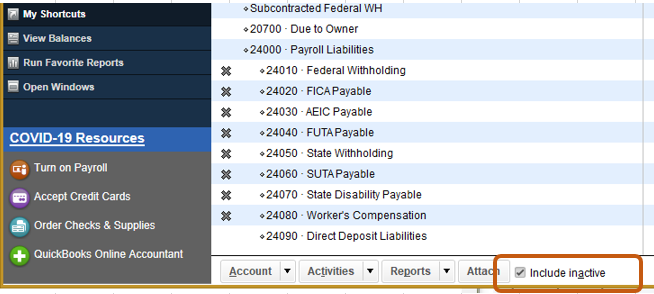
  3. Look for the inactive account and click the X mark .


Let me know if you have further questions.

Need QuickBooks guidance?
Log in to access expert advice and community support instantly.

Need to get in touch?

Contact us
