Hello, bzimmerman-rando.
I have a bunch of steps and guides to help you manage and link your deposits to an invoice.
Just to clarify, are you trying to unlink a deposit from an existing invoice to a previous one?
In this case if you've made the deposit through the Bank deposit function, you can link it to another invoice through the Receive payments screen. Here's how:
- Click the + New button.
- Select the Receive payments option.
- Choose the customer under Customer.
- Uncheck the current invoice, then check the previous one under Outstanding Transactions.
- Ensure the Deposit is checked under Credits.
- Click Save and close.
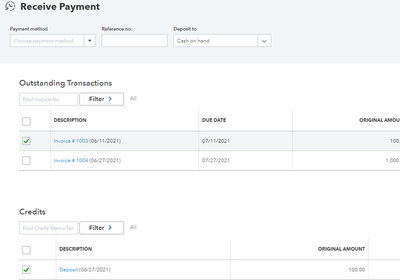
If you've made the deposit using a credit memo, do the same steps for it.
Though if you're just trying to link a deposit (not yet recorded) to a previous invoice, you'll want to create it through the Bank deposit function:
- Go to the + New button again, then select Bank deposit.
- Select the bank where you want to deposit the funds under Account.
- On the Add funds to this deposit section, select the customer under RECEIVED FROM.
- For the ACCOUNT, use the Accounts Receivable account.
- Add the amount and enter any other important information.
- Click Save and close.
Go to the Receive payments screen again, then link the invoice and the deposit. It should be noted that deposits made from sales receipt won't work with the link.
You'll want to delete it (open it, click the More button then select Delete) and recreate it as a bank deposit instead.
If you need help with your bank deposits, you can check this article: Record and make bank deposits in QuickBooks Online.
Do you use the Online Banking feature? If so, you can check this article if you need help managing your bank transactions: Categorize and match online bank transactions in QuickBooks Online.
I'd be glad to address other questions you might have regarding your deposits or customer transactions. Just reply here and I'll see what I can do for you. Feel free to add any other concerns as well. Always here to help.




