Welcome to the Community, @mcarth82. Let me help you print your quarterly payroll reports in QuickBooks Online (QBO).
There are a couple of payroll reports available in QBO. You can run either Payroll Summary or Payroll Details report, filter to the desired quarter, and print. To get started, here's how:
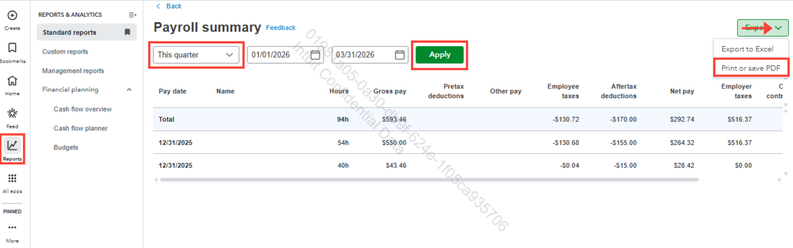
- Click Reports in the left pane of your dashboard.
- In the search field, type Payroll Summary.
- Filter the date range dropdown to select the specific quarter, then click Apply.
- Open the Export dropdown menu at the top right.
- Select Print or save PDF, then click Print to proceed.
Feel free to reply to this thread if you have other QuickBooks-related questions. We're here to help.




