Get 50% OFF QuickBooks for 3 months*

Buy now
cancel
Showing results for 
Search instead for 
Did you mean: 
Announcements
Simplify payday and set payroll to run automatically on QuickBooks. Explore QuickBooks Payroll
mcarth82
Level 1

HOW DO I PRINT QUARTLY PAYROLL REPORTS WITH THE ONLINE QUICKBOOKS

 
2 Comments 2
JayAnne_C
QuickBooks Team

HOW DO I PRINT QUARTLY PAYROLL REPORTS WITH THE ONLINE QUICKBOOKS

Welcome to the Community, @mcarth82. Let me help you print your quarterly payroll reports in QuickBooks Online (QBO).


There are a couple of payroll reports available in QBO. You can run either Payroll Summary or Payroll Details report, filter to the desired quarter, and print. To get started, here's how:


  1. Click Reports in the left pane of your dashboard.
  2. In the search field, type Payroll Summary.
  3. Filter the date range dropdown to select the specific quarter, then click Apply.
  4. Open the Export dropdown menu at the top right.
  5. Select Print or save PDF, then click Print to proceed.
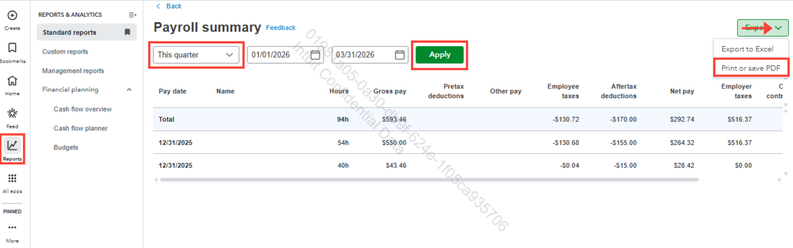
 

JayAnne_C_0-1769111780076.png


Feel free to reply to this thread if you have other QuickBooks-related questions. We're here to help.


jamesjdt
Moderator

HOW DO I PRINT QUARTLY PAYROLL REPORTS WITH THE ONLINE QUICKBOOKS

Hi @mcarth82,


I just wanted to follow up to check if the resolution we provided helped resolve your issue.


Please let us know if everything is now working as expected or if you're still experiencing any problems.


We'll be glad to assist further if needed.

Need QuickBooks guidance?
Log in to access expert advice and community support instantly.

Need to get in touch?

Contact us