Turn on suggestions
Auto-suggest helps you quickly narrow down your search results by suggesting possible matches as you type.
Showing results for
Get 50% OFF QuickBooks for 3 months*
Buy now
Hello, @Patrick7.
Let me share some insights about changing contractor's email.
If the email address is grayed out and cannot be updated, I recommend the following troubleshooting steps:
1. Click on the Payroll tab and select Contractor.
2. Choose the contractor you need to edit and click on the Pencil icon.
3. Replace the Social Security number with an incorrect, temporary number. Remember to save the changes.
4. Click the Pencil icon again and correct the Social Security number to its accurate value.
5. The Email section will become active, allowing you to edit the email address.
6. When you're done, save the changes.
Furthermore, I'm adding this article if you want to add contractors and track payments: Set up contractors and track them for 1099s.
If you have any questions or concerns about changing your contractor's email address, please leave a comment below. Take care!
This trick is no longer working. the email is still grayed-out.
Warm welcome, @uacustomer. I'm here to ensure that you can change your contractor's email.
Before anything else, once you add a contractor in QuickBooks Online, their profile will be saved in both the Contractors and Vendors tabs.
If you've changed the email in the contractor's tab but after taking the steps above, the option is still grayed out, let's update your contractor's email in the Expenses tab.
Here's how:
I've included a screenshot for visual reference.
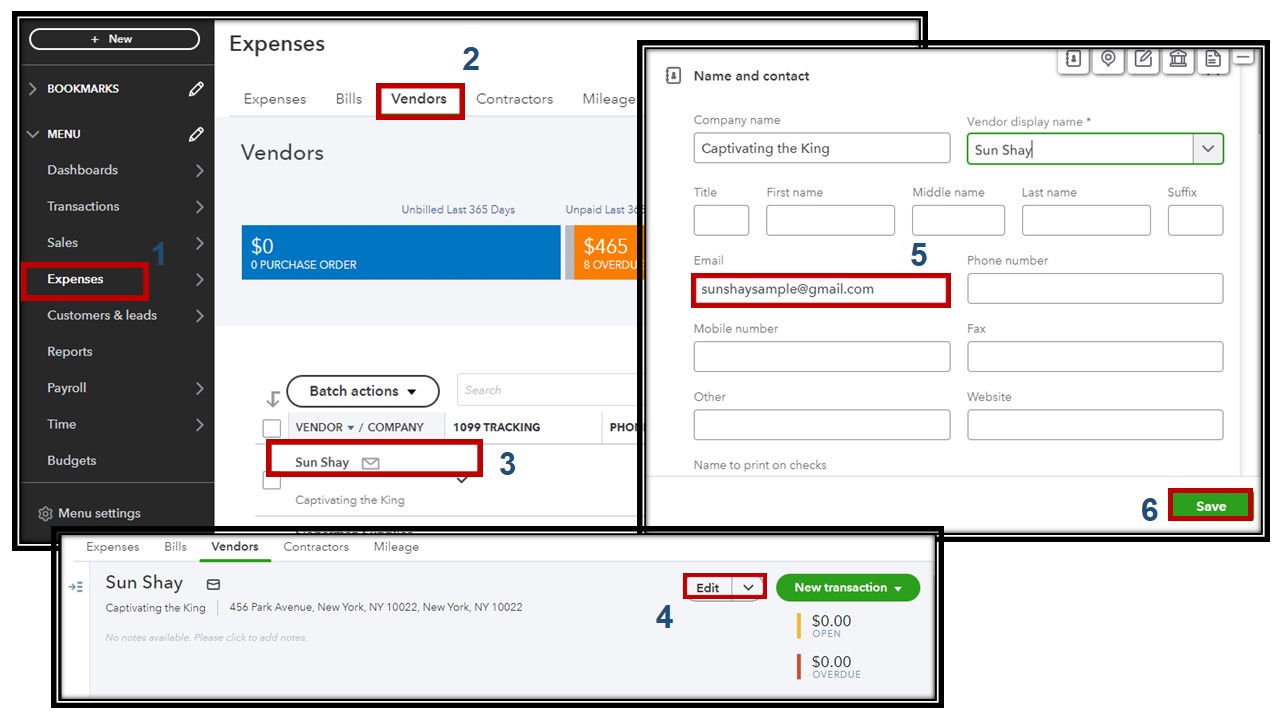
The information in the Contractors tab will automatically be updated.
On the other hand, if you want your contractors to add their tax information, you can invite them to QuickBooks Online. It's a simple and convenient way to keep track of your contractors details and ensure compliance with IRS regulations.
You can return here anytime you need further assistance changing your contractor's emails or any QuickBooks-related concerns. I'm always here to help you out.


You have clicked a link to a site outside of the QuickBooks or ProFile Communities. By clicking "Continue", you will leave the community and be taken to that site instead.
For more information visit our Security Center or to report suspicious websites you can contact us here


