Turn on suggestions
Auto-suggest helps you quickly narrow down your search results by suggesting possible matches as you type.
Showing results for
Get 50% OFF QuickBooks for 3 months*
Buy nowI have a paypal account and a paypal credit card in which I accrue rewards. I cash those rewards in and they go as a deposit into my paypal account. I'm not sure how to log this. Any help?
Regards,
Joe

Hi there, Joe.
You'll have to create an income account to keep track of the cashback rewards you've received and enter a bank deposit. To do this, I'll be happy to guide you on how.
To create an income account, see the below steps:
Once done, you're now ready to make a bank deposit and use the income account you've created. You may also consider checking with your accountant to ensure your books are accounted for correctly.
For future help, I've included an article that'll help match your QuickBooks account and bank statements: Reconcile an account in QuickBooks Desktop.
Please let me know if you have other concerns. I'm just around to help. Have a good day!
The income account is setup. However, the rest of your instruction is unclear to me.
Good to see you back, Joe.
Good job in creating an income account in QuickBooks Desktop (QBDT). You may now track your cashback rewards by making a bank deposit.
Here's how:
For more details in recording a deposit, see this article: Record and make bank deposits in QuickBooks Desktop.
Before doing the steps above, I recommend consulting with your accountant. They can provide more expert advice in dealing with this situation. You may use our Find an Accountant tool if you don't have one.
If you have any other questions about QuickBooks, let me know by adding a comment below. I'm more than happy to help. Have a good day.
what about reward points that can be used as cash. Is this considered "other income"? Creating this account in "other income" for my AMEX Rewards account has increased the income on the P&L. Is this correct? and then when these rewards are used to pay something, I just pay the amount from the income account to the airline or whatever? Is this right. Please be clear as this doesn't sound right to me.
Hello there, Carolexx. I'm here to help you record your reward points and provide more details.
To enter your reward points in QuickBooks Desktop (QBDT), you'll need to create a holding account to track the points until you’re ready to spend them.
The increase in income reflected in your Profit and Loss report (P&L) occurs because this report summarizes revenues, costs, and expenses for a specified period, and "Other Income" represents revenue from non-primary business activities.
While you're on the right track with choosing an income account, I highly recommend consulting with an accountant to determine the appropriate category for accurate recording.
Here's how to create an income account:
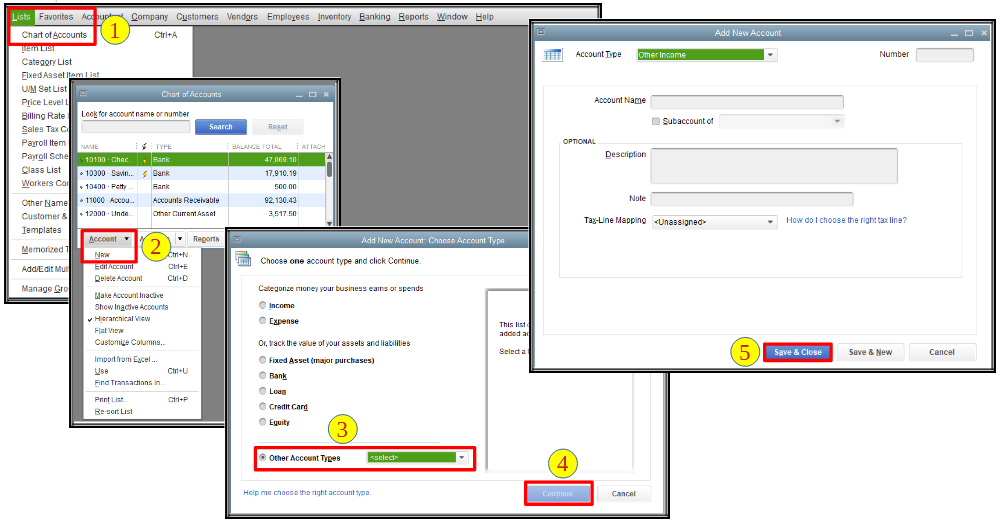
Next, create a bank deposit to enter the amount of the reward points.
To use the rewards for payment, you can create another bank deposit to transfer the amount from the income account to the bank account that you will use for the payment.
Additionally, ensure to reconcile your accounts to keep them accurate and up-to-date.
If you need further assistance recording your reward points in QBDT, please feel free to return to this thread, Carolexx. We’re here to support you every step of the way.
Ignore the response from @JanbonN. It doesn't make sense.
When you receive the rewards, record it as 'Other income' and deposit it into a bank account in QB called 'Rewards Points' or something similar. To do that, create a bank account called 'Rewards Points'. Then, make a deposit into that account and assign the appropriate other income account to the deposit. That will increase other income and the newly-created bank account by the amount of the rewards. When you want to spend the cash, just pay the expense/write the check from the rewards bank account like you would from any other bank account.


You have clicked a link to a site outside of the QuickBooks or ProFile Communities. By clicking "Continue", you will leave the community and be taken to that site instead.
For more information visit our Security Center or to report suspicious websites you can contact us here


