Turn on suggestions
Auto-suggest helps you quickly narrow down your search results by suggesting possible matches as you type.
Showing results for
Get 50% OFF QuickBooks for 3 months*
Buy nowSolved! Go to Solution.

Hi there, Elliot.
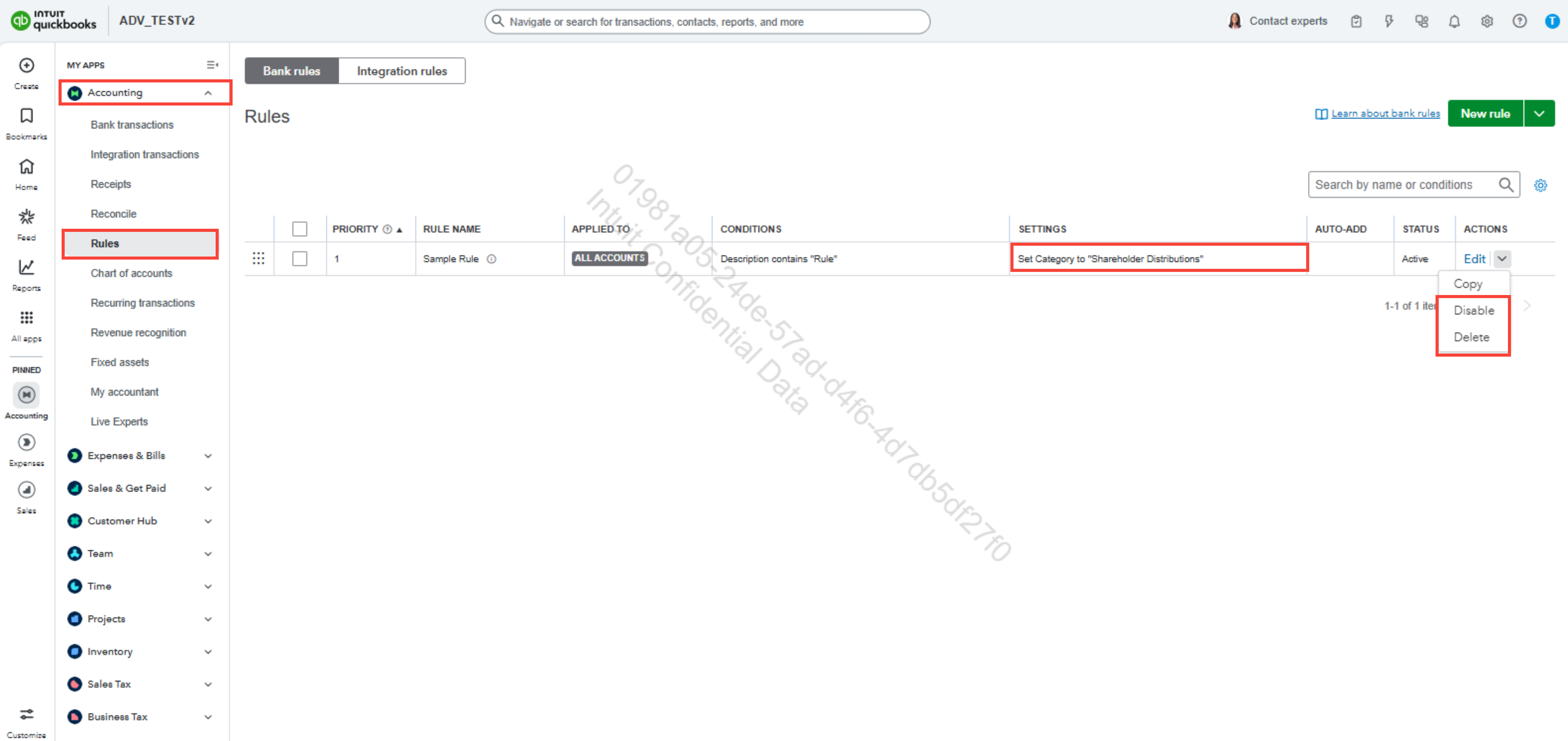
I appreciate your efforts in following the suggested steps. To proceed further, you may need to double-check your bank rules if there is a rule that automatically categorizes your transactions as Shareholder Distributions.
Here's how:
If the issue persists, we recommend contacting our QuickBooks Online (QBO) live support team. Our specialists are equipped to investigate this matter thoroughly and help guide you to a resolution.
Here are the steps to reach our support team:
You can check our support hours to see when assistance is available and ensure you receive help promptly.
Feel free to add a reply if you have further questions about QBO.
Hello there. Let's navigate together to turn off this feature to enable transaction categorization.
To begin with, we need to ensure that the Enable suggested categorization is turned off.
Here's how:
After this, the transactions will not change whenever you modify it to the correct Category and Vendor. However, if you still can't change it, we can perform basic troubleshooting by using a private browser. Private browsers will not save data, unlike regular browsers.
These are the keyboard shortcuts:
If it works fine from there, you'll want to clear your regular browser's cache. In addition, you'll want to check this article as a reference to learn how to reconcile your accounts so they always match your bank and credit card statements: Reconcile an account in QuickBooks Online.
Let me know if you need further assistance managing your bank feeds or any QuickBooks-related concerns. I'll keep an eye out for it. Stay safe.
I have followed your steps to turn off suggested categories, but it wasn't turned on.
And this problem just started within the last 90 days. It us taking a large amount of transactions and classifying them as Shareholder Distributions, and none of them are.
This is making it extremely difficult AND time consuming to have to go and change each entry.
Why did this start happening, and what can I do to change it. I would be much happier if it would have categorized it as an unknown expense instead of a Balance Sheet account.
Thanks
Elliot
Hi there, Elliot.
I appreciate your efforts in following the suggested steps. To proceed further, you may need to double-check your bank rules if there is a rule that automatically categorizes your transactions as Shareholder Distributions.
Here's how:
If the issue persists, we recommend contacting our QuickBooks Online (QBO) live support team. Our specialists are equipped to investigate this matter thoroughly and help guide you to a resolution.
Here are the steps to reach our support team:
You can check our support hours to see when assistance is available and ensure you receive help promptly.
Feel free to add a reply if you have further questions about QBO.


You have clicked a link to a site outside of the QuickBooks or ProFile Communities. By clicking "Continue", you will leave the community and be taken to that site instead.
For more information visit our Security Center or to report suspicious websites you can contact us here


