Turn on suggestions
Auto-suggest helps you quickly narrow down your search results by suggesting possible matches as you type.
Showing results for
Get 50% OFF QuickBooks for 3 months*
Buy nowHad to convert to QB Online when Apple updated their OS and it would not talk to the desktop version I have been using for the last four years. I'm a one-man show for our small company. I cannot print invoices or receivables reports at all. The only thing that prints is the format of the document, not any contents. QB support says they are working on the problem, but I've been using the program for two weeks and they are not working on it fast enough. Anyone else in this leaky boat?

I understand the importance of printing invoices in QuickBooks Online (QBO), ScottBayles. I'm here to ensure you're routed to the best support available so you can get back to business seamlessly.
Currently, there's an ongoing investigation into the inability to print reports and transactions in QBO using Mac computers. Please know our engineers are already aware of this matter and are implementing measures to provide a resolution as soon as possible.
I recommend contacting our Support Team to add you to the list of affected users. This way, you'll be notified of any progress. Rest assured that you'll receive updates when fixes are available.
Here's how:
See this article for the support hours: QuickBooks Online Support. It includes the contact number you can use to call us directly.
Additionally, I've added an article that'll help you personalize the appearance and layout of sales forms so you can add the info that matters most to your business: Customize Invoices, Estimates, and Sales Receipts.
I'd appreciate your patience and understanding while we look into this further. If you have any further concerns, feel free to reach out. Have a great day.
You should switch back to QB Desktop.
I am having the same problem. I have a MAC desktop and a laptop. I can print off the laptop, but not the desktop. The fields are empty on both estimates and invoices. I use QB online. I thought it might have something to do with the new format, but I can't find a way to fix it.
I understand the frustration you're experiencing with printing sales forms from your desktop, @jpdiggers. Rest assured, I'm here to help you resolve this and ensure you can successfully print invoices in QuickBooks Online.
Please know that our Product Engineers are aware of the issue and have discovered the root cause is the new Apple MacOS version Sonoma. This issue occurs when you attempt to print a document using the Mac Preview application. It's the default that opens when you click on Print in QuickBooks.
There are early indications that Apple will address this in the upcoming updates to MacOS. In the meantime, we can change the invoice template to Airy New as a workaround. This can be done from the Custom Form Styles page. I'll guide you on how:
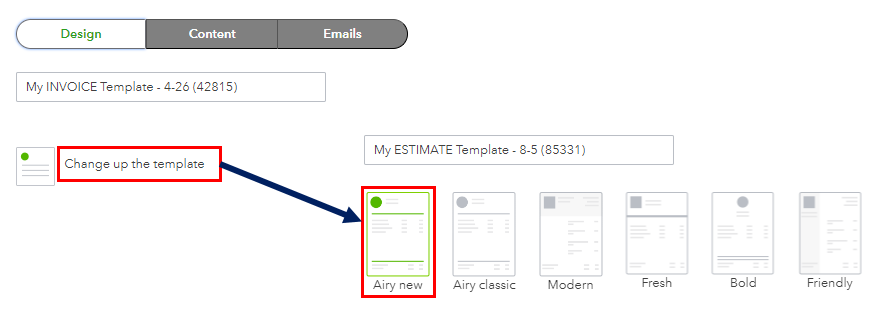
Additionally, you may find further guidance from this article on resolving printing issues in QuickBooks: Fix QuickBooks Online printing issues on browsers for Windows.
You can get back here anytime you need assistance with printing sales forms in QuickBooks Online. The Community is always available to help.


You have clicked a link to a site outside of the QuickBooks or ProFile Communities. By clicking "Continue", you will leave the community and be taken to that site instead.
For more information visit our Security Center or to report suspicious websites you can contact us here


