Hi there, @turnandpaint. I've got the instructions you need to reverse an invoice payment.
Would you like to record a customer refund? You can use Refund Receipts if a customer asks for a refund for an item or service.
- Click + New, then Refund receipt.
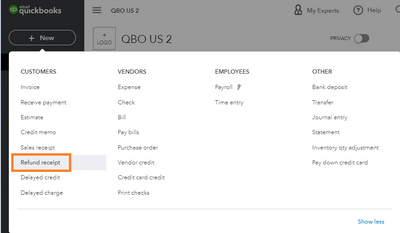
- Select the customer you want to refund from the Customer dropdown.
- Enter the details in the fields using the info from the original sale.
- Choose which payment method and account you wish to refund the customer from.
- Hit Save and close.
However, if you accidentally marked this invoice as paid, you can delete its payment by following these steps:
- Click on Sales at the left pane, then select All Sales.
- Locate the payment from the list, then open the transaction.
- From the Receive Payment window, click on Delete from the More button.

- A pop-up window will appear that the transaction is linked to others. Hit Yes, to confirm the action.
Lastly, if you use QuickBooks Payments to process payments, you have the option to reverse or void a sale. You may incur a fee with refunds or return transactions depending on your pricing plan and transaction type. For further details, check out this article: Understand Fees for Refunds or Void Transactions.
Fill me in should you need further assistance with this return process. The Community team will always here to help. Have a great day ahead!




