Get 50% OFF QuickBooks for 3 months*

Buy now
cancel
Showing results for 
Search instead for 
Did you mean: 
Announcements
Simplify payday and set payroll to run automatically on QuickBooks. Explore QuickBooks Payroll
Goldsaul
Level 1

Legal on Invoice

We are looking to include a long legal description on our invoices for our protection. Has anybody included the legal wording on an invoice so it prints properly with the legality?

2 Comments 2
MirriamM
Moderator

Legal on Invoice

It’s great to see you here in the Community space, Goldsaul. I’d be happy to assist you in including a detailed legal description on your invoices, ensuring they are compliant for printing.


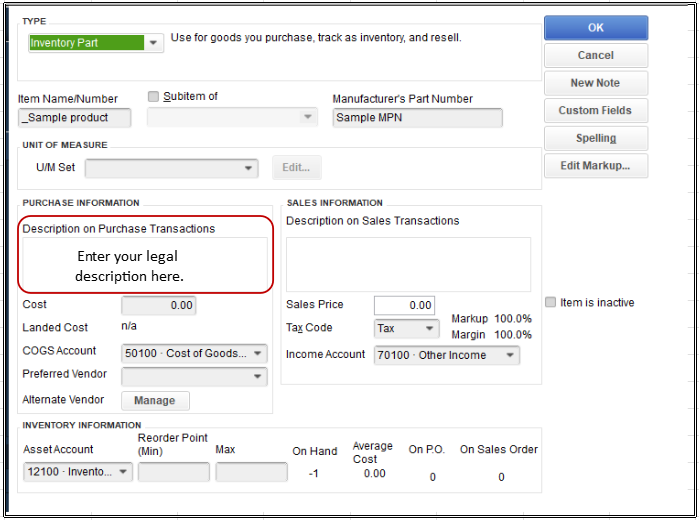
In QuickBooks Desktop (QBDT), you have the option to add a description for the items you wish to include on an invoice, with a maximum character limit of 3,975.


To create an item, here's what you'll need to do:


  1. On your QBDT account, go to the Lists menu.
  2. Choose Item List.
  3. Select Item then New.
  4. Click New Item.
  5. Select the type of item you want to create.
  6. Fill out the item fields.
  7. Select Save.


Item Description.png


For further information on the maximum character limits for fields in your company data, check out this article: Character limitations for fields in QuickBooks.


For your future reference, you can check out this article on how to record invoice payments: Record an invoice payment.


If you have additional questions or require help with managing your invoices according to your business requirements, don’t hesitate to reach out, Goldsaul. I’m ready to assist you!


BigRedConsulting
Community Champion

Legal on Invoice

If you want to add a static legal (or other) text to all invoices that use a given template, you can do that in the layout designer:

- Open your Templates list from the Lists menu, then Edit the invoice template that you want to add the text to (it has to be a custom template, not one of the canned ones.)

- Click the Layout Designer button.

- In the layout designer, right click and select Add, and then Text Box.

- Enter the desired text in the text box and then click OK to add it to the invoice.

- Then size and position it where you want it, probably at the bottom of the invoice.

Need QuickBooks guidance?
Log in to access expert advice and community support instantly.

Need to get in touch?

Contact us