Turn on suggestions
Auto-suggest helps you quickly narrow down your search results by suggesting possible matches as you type.
Showing results for
Get 50% OFF QuickBooks for 3 months*
Buy nowWhen I run a collections report the Past Due column is incorrect, for example dates of two different invoices, 11/17/2021 and 11/23/2021, both are saying 20 days past due?

Glad you've visited us here today, @kiannone.
I'll share some information about the Collection Report. The Past Due column will depend on the days you've entered on the Min Days Past Due field. You'll want to edit the number of days and then Run report to refresh the info.
Here's how it looks like:
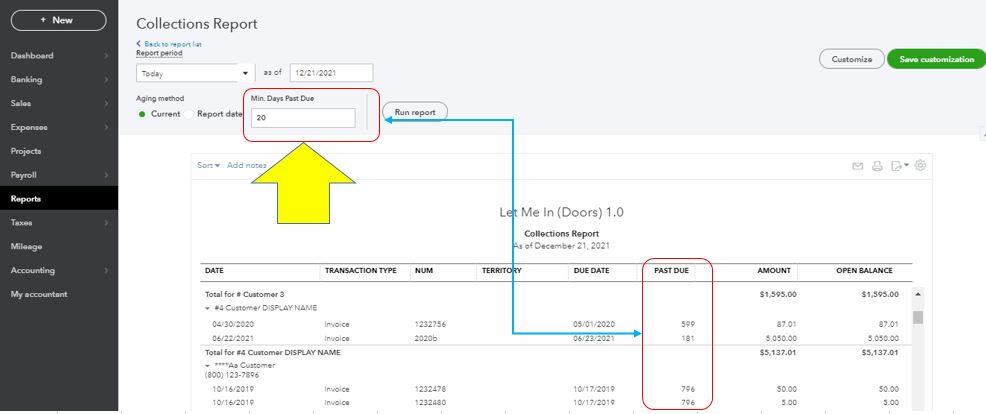
If you're still getting the same result, please access your account using a private browser or an incognito window. Here's how:
Then, pull up the report again. If it's working fine, go back to your original browser and clear the cache.
Additionally, here's a link that covers all the tasks you can do when using the reports feature. Feel free to browse: Create and manage reports.
Get back to me again in this thread if you have other questions or concerns with reports. I'll be around for you. Take care and have a nice day ahead.
Thank you, I tried all you advised, but still having the issue. Giving you a pdf to see, 6 different dates all coming up 21 past due?
Hello again, kiannone.
I appreciate you performing the troubleshooting steps to resolve this.
Since it persists, I recommend contacting our Customer Care Team. This way, they'll be able to check further the root cause of the issue.
To reach them, click the ? Help button at the top-right corner and select Contact Us to talk with a live agent. Ensure to review their support hours, so you'll know when agents are available.
To help you utilize the Reports feature, here's an article that you can read: Run reports in QuickBooks Online.
If you have any other concerns, you're more than welcome to reply here with the details. I'm here to help. Take care and have a great day.


You have clicked a link to a site outside of the QuickBooks or ProFile Communities. By clicking "Continue", you will leave the community and be taken to that site instead.
For more information visit our Security Center or to report suspicious websites you can contact us here


