The Community has you covered, @Phil51.
The Profit and Loss report won't show the payments associated with a job if:
- The date filter/range and accounting method used are incorrect.
- There's a data issue within your company file.
I can share the fixes needed to help resolve the issue you're having. First, let's ensure to use the correct date and report basis when running the said report. To achieve this, you can select one from the Dates and Report Basis drop-down, respectively.

Second, let's make sure to update QuickBooks Desktop to the latest release to have the latest features and needed patches.
If the issue persists, you can open a sample file to test if you'll get the same outcome. Here's how:
- Open your QuickBooks Desktop.
- On the No Company Open screen, select a sample file from the Open a sample file drop-down.
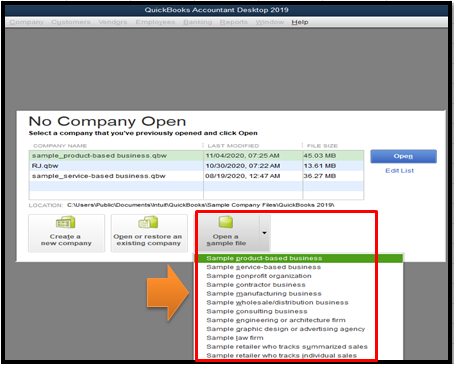
- Enter some test payment transactions for a certain job. Then, please access the said report again.
If it works this time, then the original file may be damaged. In this case, I suggest running the QuickBooks Verify and Rebuild tool. This can help identify and repair data damage.
Here's how to Verify your data (original company file):
- Go to the File menu at the top.
- Select Utilities, and then choose Verify Data.
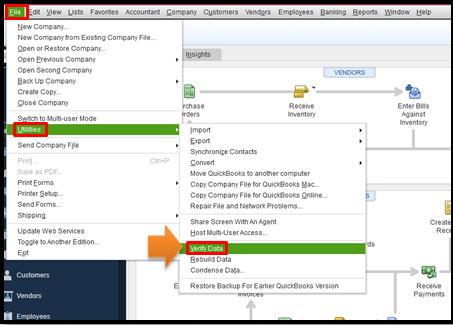
If the Verify data detects an issue, you can Rebuild your file. For the detailed steps, please refer to this article: Verify and Rebuild data in QBDT.
You can also personalize your reports to get the details that you need. Then, you can memorize them to keep a copy. This way, you'll be able to access them anytime for future use.
Keep me posted if you need more help with managing your reports. The Community is here to assist you.




