Turn on suggestions
Auto-suggest helps you quickly narrow down your search results by suggesting possible matches as you type.
Showing results for
Get 50% OFF QuickBooks for 3 months*
Buy now

Sharing with you the right amount of information and helping you regain the visibility of your payees in the QuickBooks app is my priority, lwash.
Before we proceed, could you confirm the type of payee you're trying to add when entering expenses? Are these payees tracked as employees in your books? Have you received a message similar to the one I received? Please refer to the sample screenshot for additional context.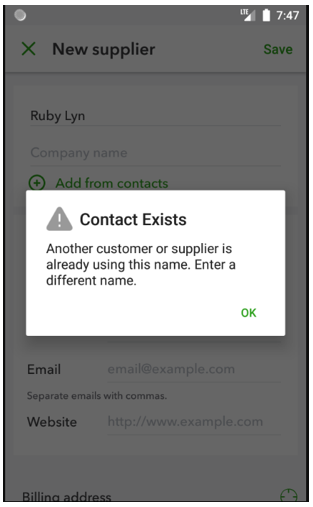
If so, please know that QuickBooks app only shows payee lists for suppliers and customers, which is why you're not seeing employees in the payee list. This is also why you received a prompt stating that the name already exists.
In this situation, I suggest that you record your expenses using a mobile or a web browser so that you can select the employee from the payee lists. You can visit this article to find guides about the supported web browser and mobile operating system that work best with QuickBooks: System requirements for QuickBooks Online.
If all the payee lists, including the vendors and customers, are missing, we can perform some troubleshooting steps to restore them in the system. Here's how:
Additionally, I've provided an article for you to review the features available on mobile devices: Compare mobile app features.
Comment below if you still need help adding expenses and selecting the appropriate payee in QuickBooks. I'm always available to support you.
This isn't the case. The app is arbitrarily not showing payees. I've refreshed data, etc. I must be online on my desktop now to reconcile. They're not employees.
We appreciate you for bringing this issue to our attention, @angie98.
I understand the importance of having the payee list present in your expenses. Since the issue persists, I recommend contacting our Customer Care Support team. They have the necessary tools and expertise to assist you in resolving this problem with your expenses.
Here's how to contact us:
Please note that for Plus, Essentials, and Simple Start subscribers, support will be available M-F from 6 AM to 6 PM PT and Saturday from 6 AM to 3 PM PT. For Advanced subscribers, you may contact support any time and any day.
In the meantime, you can use the mobile browser to get back to work since using the app isn't doing you any favor.
You can refer to this article if you want to learn how to record billable expenses in QBO: Enter billable expenses in QuickBooks Online.
I appreciate your patience in this kind of matter. If you need assistance with expenses in QBO, please feel free to contact us. We're always available to help you.


You have clicked a link to a site outside of the QuickBooks or ProFile Communities. By clicking "Continue", you will leave the community and be taken to that site instead.
For more information visit our Security Center or to report suspicious websites you can contact us here


