Hello, I Fly. You can still use the recurring transactions, and make sure you set up ACH and credit card payments as Online payments.
In QuickBooks Online, you can easily set up ACH and credit card payments for your customers and use them as payment options for recurring transactions. Before we proceed, let me explain the difference between recurring invoices and recurring sales receipts.
Recurring invoices are used for billing customers for regularly provided products or services while recurring sales receipts are used when you receive payment upfront for products or services.
Depending on your business needs and billing process, choosing the right type of recurring transaction is important. Both recurring invoices and recurring sales receipts can help automate billing and improve the efficiency of managing customer payments.
First, to set up ACH and credit card payments, ensure the ACH is selected as the primary payment method in the customer profile. Here's the process you can follow:
- Go to the Sales menu and select Customers.
- Find the customer you want to set up for ACH and Credit card payments and click on their name.
- In the customer's profile, click Edit, scroll down to the Payment, and select ACH as the Primary payment option.
- Click Save once done.
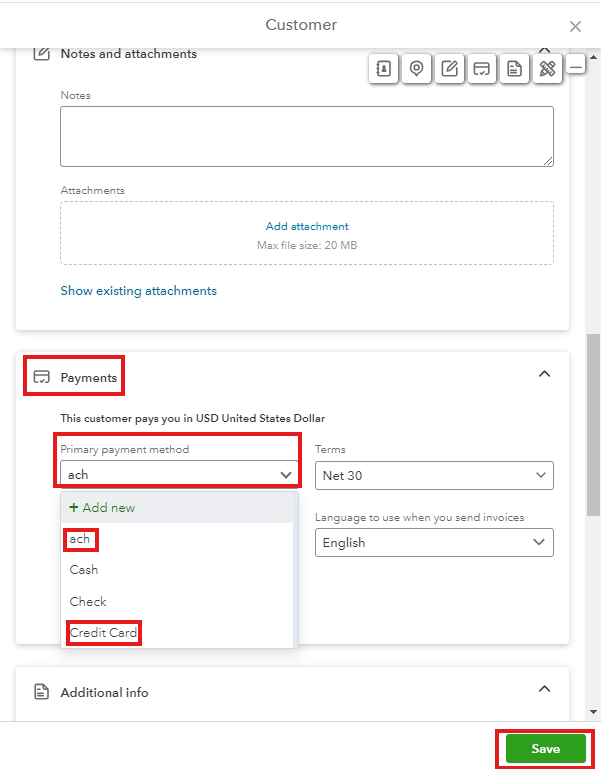
Once setting up your customer payment option is completed. Ensure that your online payment is enabled to allow ACH payments. Here's how:
- Go to the Gear icon and select Account and Settings.
- From the left menu, choose Payments.
- Then click on the Learn more link under Bank transfers. Follow the prompts to enable ACH payments.
Also, ensure that the Payment option is enabled in your recurring transactions for your customers to use. Here's how to do it:
- Click the Gear icon and select Recurring transactions.
- Select the Recurring transactions you created.
- Click Edit.
- Make sure you turn on the Credit card, Bank transfer, and other payment options if needed.
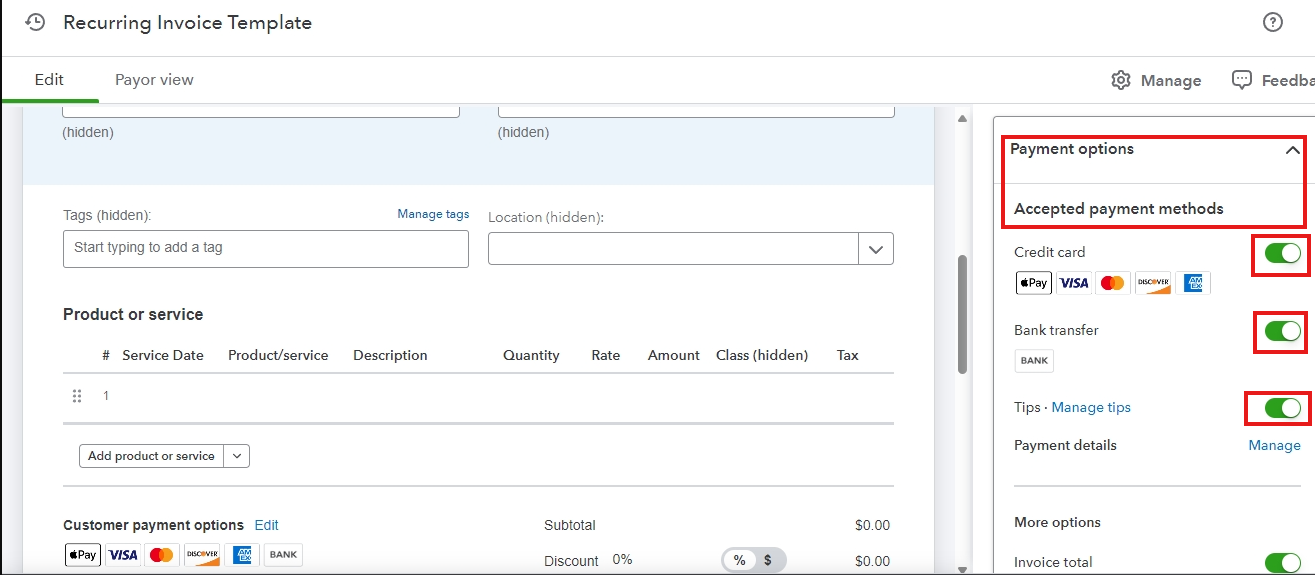
You can refer to these articles to set up automatic payments for recurring invoices and how to create recurring transactions in QuickBooks Online:
Moreover, here's an article to help you manage your recurring transactions in QuickBooks Online. It shows a list of these transactions and the accounts linked so you can review them.
Furthermore, you can track and enter customer-paid invoices and run specific reports to help review your business finances and other accounting data.
Feel free to ask if you have any further questions or need clarification with the payment option in QBO. Have a great day.




