I'll be happy to guide you through the process of changing estimates to quotes in QuickBooks Online (QBO), juancderas1.
We can modify the form estimate to quote by going to Custom from Styles. Please know that these will only apply to the customer-facing view. QuickBooks will still use Estimate for the user interface and reporting. The word Quote will appear once you click the Print or Preview button.
Here's how:
1. Go to the Gear icon at the top right.
2. Under Your Company, select Custom Form Styles.
3. If you have a template for the estimates, click the Edit link below the Action column.
4. If you don't, click the New Style button and select Estimates.
5. Click the Content tab and select the header of the template.
6. In the Form section, change the Form name to Quote.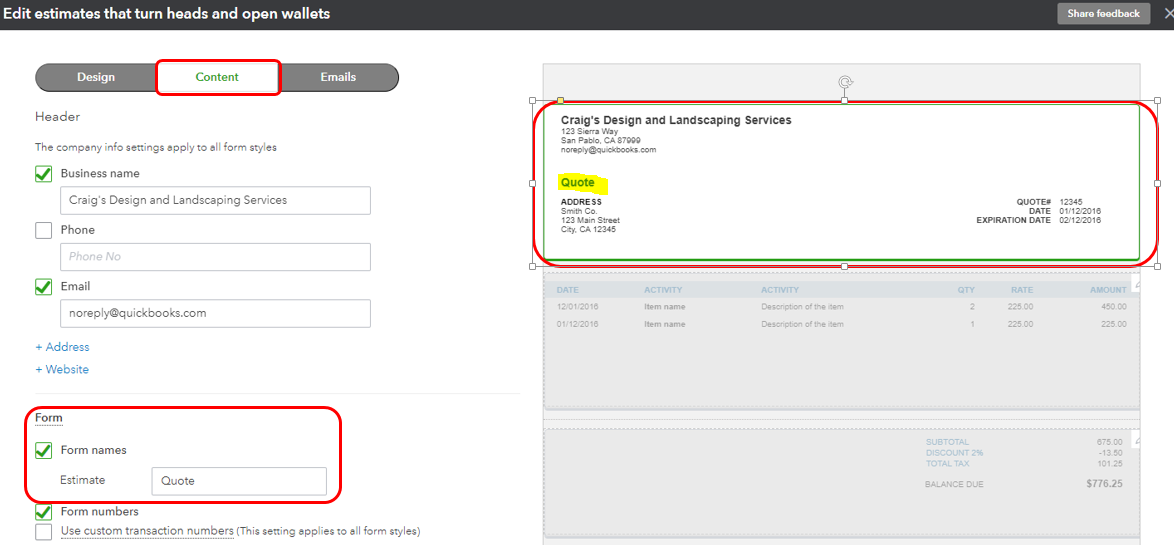
7. Click Done.
8. To set this template as the default, click the drop-down arrow below the Action column and select Make default.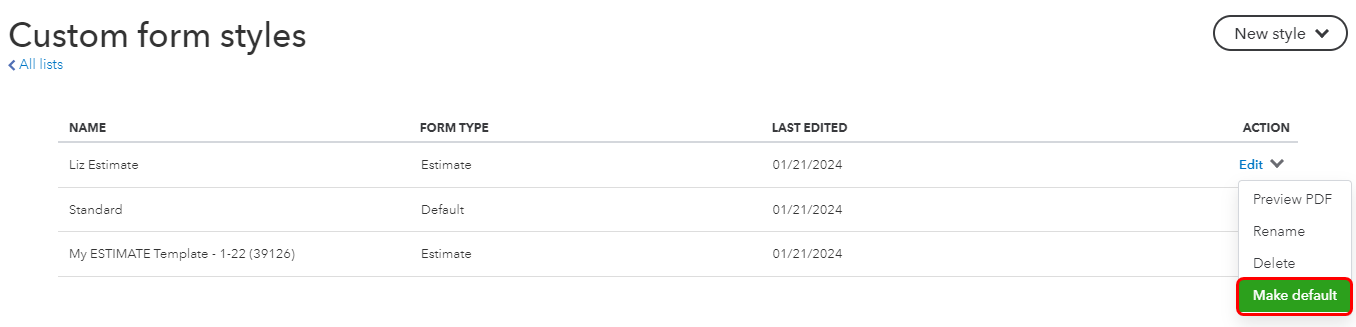
You can refer to this article to personalize your forms: Customize invoices, estimates, and sales receipts in QuickBooks Online.
Additionally, you'll want to pull up some reports that can give you a snapshot of your business:
Keep me posted if you need a hand with customizing forms in QBO. I'm always here to help. Have a great day ahead.




