I can help you check your settings, info1273.
I've checked for similar reported issues on our system and didn't find any. To fix this, we can further check your settings and see to it that the PDF attached option is selected. Then, we'll try sending a dummy invoice into your email to verify that a PDF invoice is attached.
I'll show you how to check your settings:
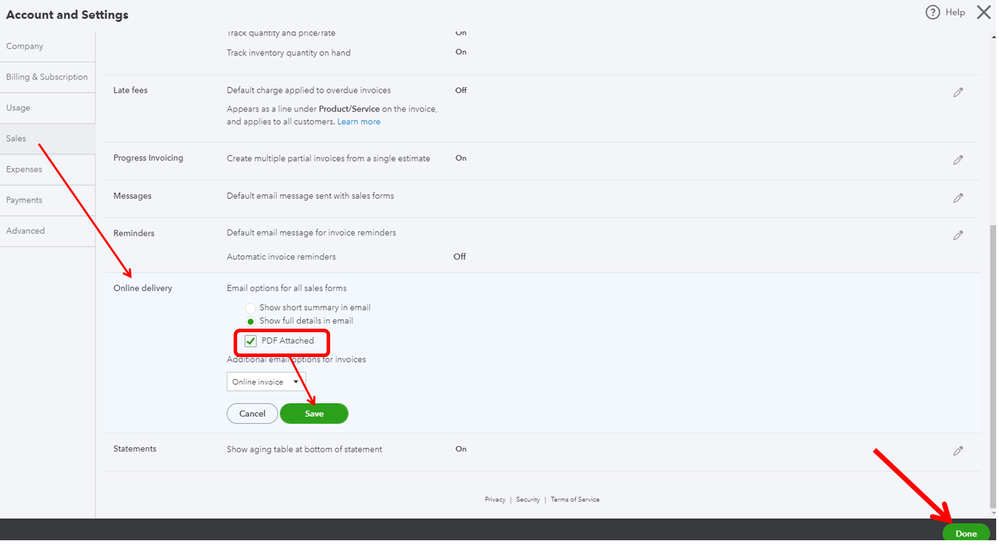
- Go to the Gear icon and select Account and Settings.
- From the left menu, click Sales.
- Click the pencil icon under Online delivery.
- Uncheck and check the PDF Attached box.
- Click Save and then Done.
- Press F5 in your keyboard to refresh and update changes.
Create an invoice and send it to your email. Open your email to see if it's working as expected. We can also look into your invoice template.
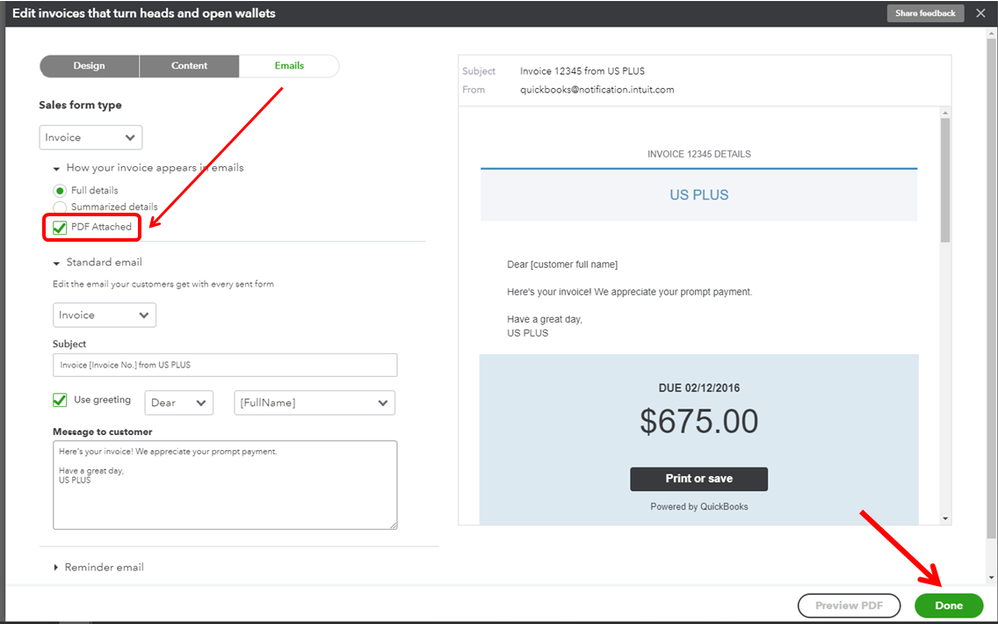
- From the Gear icon click Custom Form Styles.
- Look for the invoice template and click Edit.
- Go to the Emails tab and under the How your invoice appears in emails make sure that the PDF Attached box is selected.
- Click Done.
I'll be attaching a few articles that will help manage your invoice settings and customize them:
You can always mention me in your reply if there's anything else that you need. You take care always have a great day!




