Turn on suggestions
Auto-suggest helps you quickly narrow down your search results by suggesting possible matches as you type.
Showing results for
I am in the middle of reconciling hte bank account and out of nowhere after I click on a deposit, the checked amount goes to the bottom of the column? It stops and buffers and them moves it to the bottom? How do i undo this, I like the old setting where I just check off the amount and thats it.
@PremierRef2019 It sounds like the program is sorting your list of transactions by the Checkmark column.
As such, every time you add a checkmark, the list has to resort itself.
Click on the column heading that you want the list to be sorted by, and it should fix itself.
Hi there, @PremierRef2019.
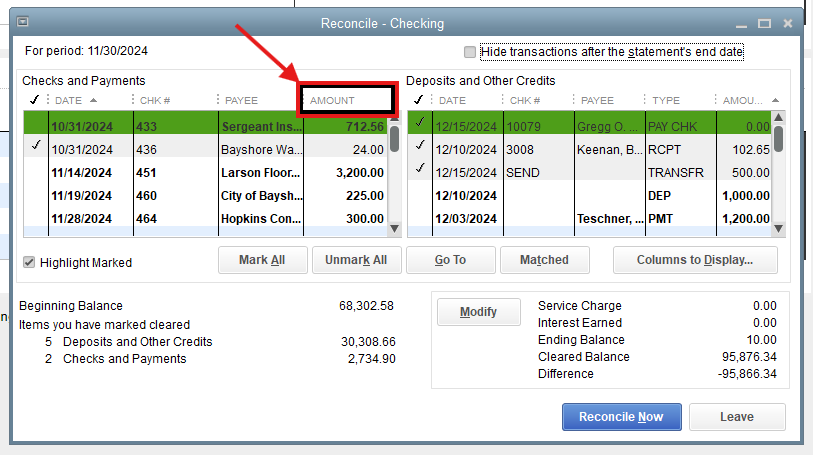
QuickBooks Desktop automatically resorts itself after you select the transactions to reconcile. I agree with @FishingForAnswers about clicking the Amount column to fix the auto-sort.
Once you click the Amount column, all selected transactions will be sorted at the top. Then, you can freely select other transactions by their amounts without the transaction list randomly moving every time you select one.
You can also consider closing your books to avoid unwanted changes at the end of every fiscal year.
Let me know if you have further concerns with QuickBooks Desktop. We're always ready to help.
You have clicked a link to a site outside of the QuickBooks or ProFile Communities. By clicking "Continue", you will leave the community and be taken to that site instead.
For more information visit our Security Center or to report suspicious websites you can contact us here
