Hi genacc2220,
Yes, it is possible to edit the beginning balance in QuickBooks Online. The steps may vary depending on the situation.
If this is your first time reconciling the account, we can update the beginning balance directly in your register. Here's how:
- From the Home (Dashboard) page, click All apps, then Accounting.
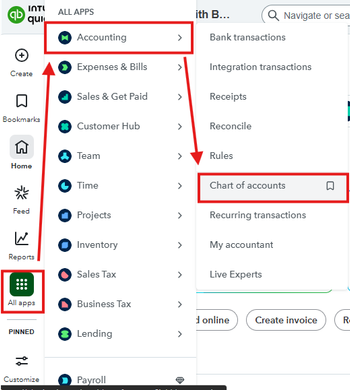
- Choose Chart of accounts and click View register for the account you want to adjust.
- Locate the deposit affecting the Opening balance equity.
- Update the amount and ensure the entry remains marked as Reconciled (R).

- Click Save, then choose Yes to confirm.
You can check out this reference for additional guidance: Fix issues the first time you reconcile an account in QuickBooks Online.
If the account was previously reconciled, you'll need to correct the beginning balance using a slightly different process. You can follow this article for the step-by-step instructions: Fix issues with your beginning balance for accounts you've reconciled before.
Once the beginning balance is corrected, you can proceed with reconciling the account.
Feel free to reach out if you need further assistance.




