Turn on suggestions
Auto-suggest helps you quickly narrow down your search results by suggesting possible matches as you type.
Showing results for
Get 50% OFF QuickBooks for 3 months*
Buy now
Yes, you can! Creating recurring invoices and printing them with invoice date can be done in QuickBooks Online, jkarnes1. I'll make sure you'll accomplish these tasks.
We can start creating a recurring invoice by going to the Gear icon and pick Recurring transactions under the Lists column. To record a recurring invoice, you can open it. The steps below will guide you through the process.
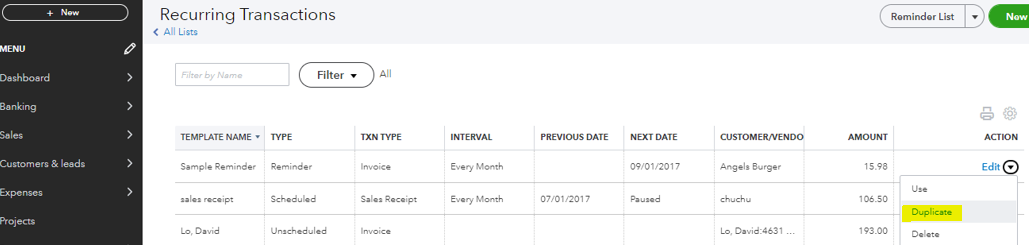
Then, make a copy by going to the recurring lists.
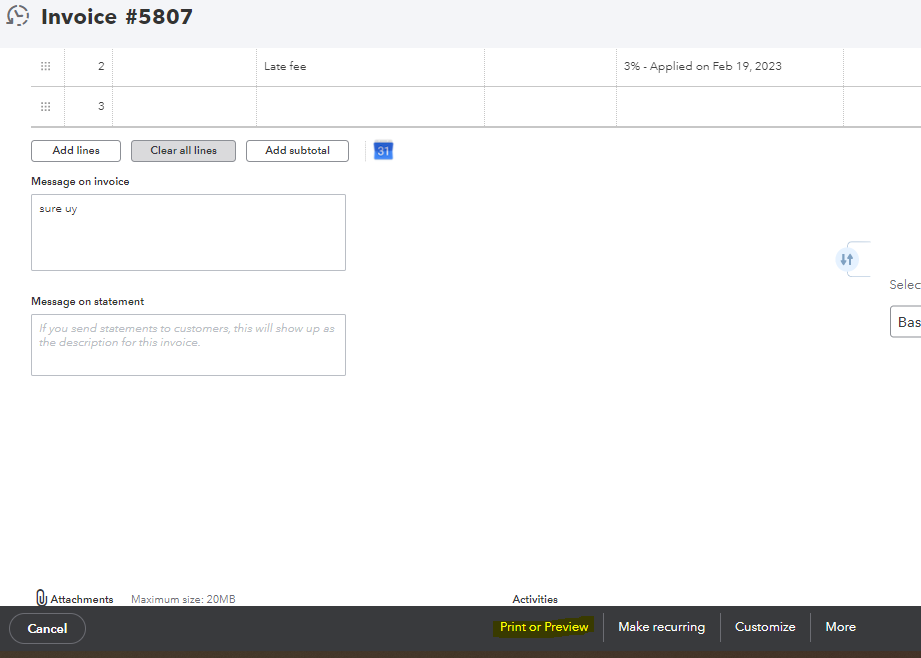
Finally, you can print an invoice with invoice date by follow these steps.
Here's an article for more details about modifying a recurring transaction template in QuickBooks Online: Edit a recurring template in QuickBooks Online.
I'm always here to help you with any questions or concerns you may have. Don't hesitate to reach out to us if you need assistance about recurring transactions. Have a great day!
Hi,
I have a number of customers that want a hard copy invoice every month, can quick books do that automatically? or do I have to print the invoices out every month and mail them myself.
I understand quickbook can email invoices monthly, but I need to actually send hard copy to these clients monthly
Please advise
It's good to see you here, J5russo. While QuickBooks Online (QBO) doesn’t support auto-printing invoices, I’ve got some tips and workarounds to help you manage this efficiently.
First and foremost, I encourage you to communicate your thoughts directly with our product development team using the Feedback option in your QBO. They're genuinely interested in hearing your input and highly encourage you to share your requests and suggestions.
Here’s how you can do it:
In the meantime, I suggest setting up recurring invoices for your customers and mark as Print later to automate the monthly invoice generation. Although you will still need to print them manually, this approach will save you time.
To set it up, here's how:
Additionally, you can streamline your workflow by printing invoices in batches to increase efficiency.
Follow the steps below:
You could also explore third-party applications that specialize in automating the printing of invoices. Visit this link to see available apps: QuickBooks App Store. Navigate to the CATEGORIES section and select an app that best fits your business.
Furthermore, I recommend bookmarking these valuable articles on managing invoices in QBO. These resources provide insightful guidance on setting up automatic reminders to your customers and personalizing your invoices to enhance your communication and branding:
I appreciate your input as it helps us improve our services to meet customer needs. If you have additional questions or concerns regarding your invoices in QBO, please click the Reply button. I want to ensure you feel confident and supported navigating your QuickBooks settings.


You have clicked a link to a site outside of the QuickBooks or ProFile Communities. By clicking "Continue", you will leave the community and be taken to that site instead.
For more information visit our Security Center or to report suspicious websites you can contact us here


