Let me provide some information in adding accounts in QuickBooks Online, @kingmejeremy-gma.
When adding accounts to QuickBooks Online, we can go through the Chart of Accounts so you can add your personal and business accounts to QuickBooks.
Here's how:
- Go to the Gear icon and choose Chart of Accounts.

- Click New in the top right corner.

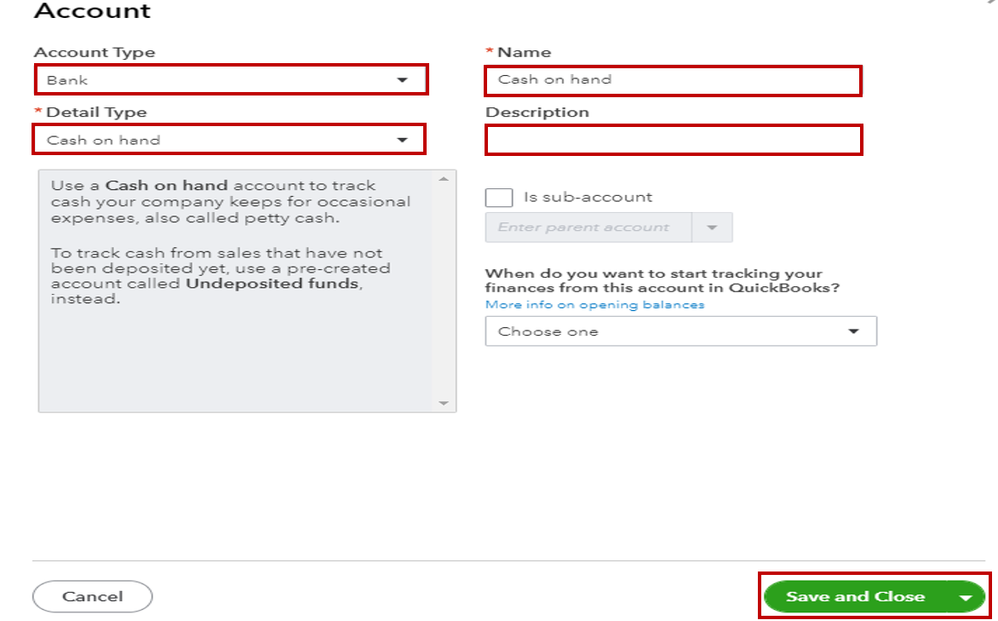
- Choose on the Account Type drop-down to select the account type.
- Select the Detail Type to specify the type of account that you want to add.
- Enter the name of the account in the Name field.
- You have the option of including information in the Description field and an amount in the Balance field.
- Click Save and Close.
I've also added these articles that contain further information on this:
Fill me in if you have other concerns in QuickBooks Online. I'm more than willing to help. Have a pleasant day.




