Get 50% OFF QuickBooks for 3 months*

Buy now
cancel
Showing results for 
Search instead for 
Did you mean: 
Announcements
Simplify payday and set payroll to run automatically on QuickBooks. Explore QuickBooks Payroll
Anonymous
Not applicable

Currency After Dataswitcher Conversion from Sage

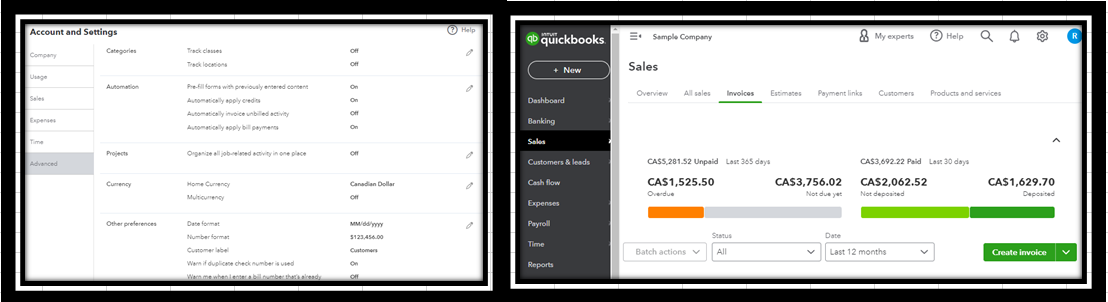
I converted our Sage 50 (Canada) data to QBO. The process worked well. However, I have a currency issue now. I was using Sage 50 Canadian edition for a US company. We only deal in one currency (USD). So there was never a need to setup a US currency in Sage. I just used the default which I guess was CAD. After the conversion, the balances are correct; however, the currency in QBO is CAD. Can I change that to USD in QBO and what impact would that have? Would it apply a currency conversion rate to the amounts?

2 Comments 2
MichelleBh
Moderator

Currency After Dataswitcher Conversion from Sage

Thank you for explaining your concern clearly, @Anonymous. 


I'm glad to show you how to change the currency in QuickBooks and how that changes your balances.


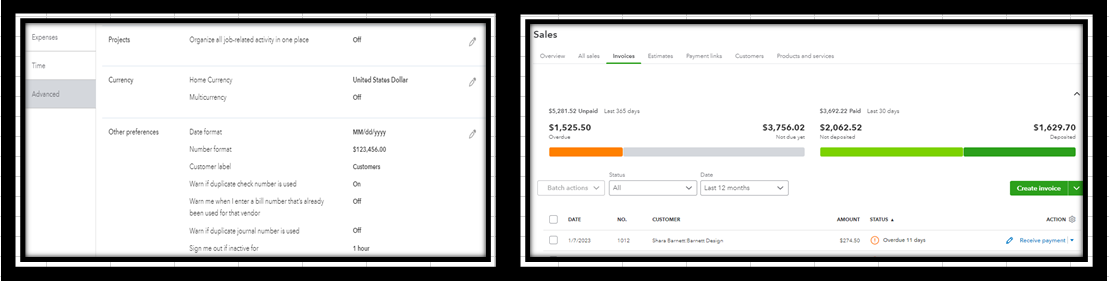
You can change your home currency only when you have not activated the Multicurrency functionality in QuickBooks Online. Please be aware that altering the currency symbol for transactions will affect only the currency symbol, not the amounts. Hence, if you have a transaction with the currency, sign CAD1,525.50 and convert it to USD1,525.50. 


Here's how:


  1. Go to the Gear icon, then Account and Settings.
  2. Select Advanced and double-click the Currency field. 
  3. Choose United States Dollar in the drop-down. 
  4. Click Save, then Done


Also, check out the articles below to learn how to assign a foreign currency to a customer and manage them in QuickBooks if you expect to have one soon:


Please leave a word below if there is anything else I can do to assist you. I will come back and help you further. Enjoy the rest of the day.

Fiat Lux - ASIA
Level 15

Currency After Dataswitcher Conversion from Sage

@Anonymous 

You must contact DS to convert your data again. Otherwise, consider to purchase another 3rd party service to convert your data. Data conversion with multicurrency transactions is not easy and you need time to manually revaluate it.

Need QuickBooks guidance?
Log in to access expert advice and community support instantly.

Need to get in touch?

Contact us