Turn on suggestions
Auto-suggest helps you quickly narrow down your search results by suggesting possible matches as you type.
Showing results for
Get 50% OFF QuickBooks for 3 months*
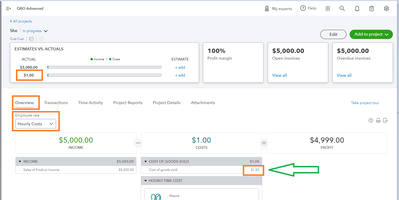
Buy nowI just switched over to online from desktop. when i am in projects, pick a customer, run the estimate vs actual report. is there a way to click on the cost in the actual column of a line to expand what the costs are for that line? In desktop you could click on the cost number, and it took you to a report of what charges that number was made up of.
@sbmom I just switched over to online from desktop.
I'm afraid that will turn out to be your biggest issue.
At any rate, based on my experiences with Online, sometimes it will function correctly, sometimes it will not, as in the case of retrieving sub-reports.
No doubt one of the staff will be along shortly to tell you that the problem is with your browser's cache.
Hi there, @sbmom.
I will provide you with the steps to access a detailed cost breakdown of your project.
Currently, when you click on the amount from the dashboard, you are unable to view the breakdown of the transaction. However, let me provide you another way to view it. Here's how:
Additionally, for more detailed information, you can refer to this article: Compare project cost vs actuals in QBO Advanced.
Moreover, you can visit this article to see your best sellers, what's on hand, the cost of goods, and more: Use reports to see your sales and inventory status.
If you have any additional questions regarding your project, don't hesitate to let me know. Have a great day!
You have clicked a link to a site outside of the QuickBooks or ProFile Communities. By clicking "Continue", you will leave the community and be taken to that site instead.
For more information visit our Security Center or to report suspicious websites you can contact us here