Hello, asaloof-aol-com.
Thanks for choosing us for your business! I'll lay down some details to help you navigate to the Transactions tab, and ensure you'll be able to record your credit card transactions.
It sounds like you're under the new user interface update. This is the reason why you're unable to see the Transactions tab.
We recently updated our QuickBooks Online interface but not all users have this update yet.
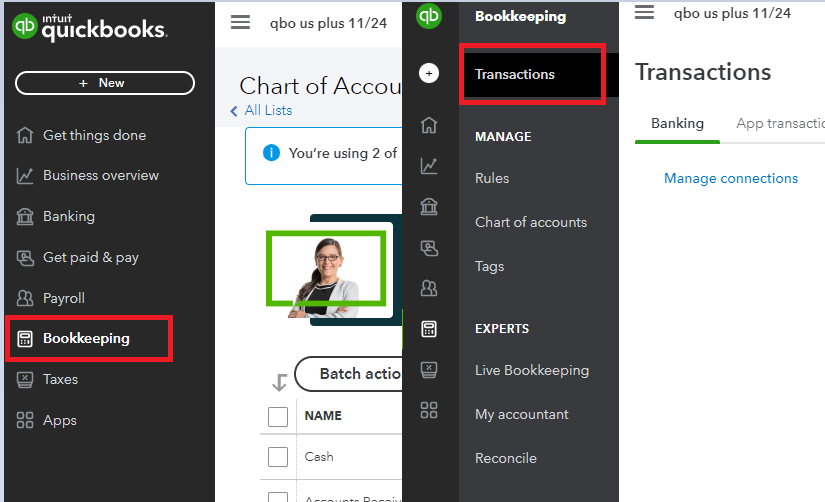
Just to clarify, are you trying to manually import your transactions in QuickBooks? If that's the case, the new location for the Transactions tab is under the Bookkeeping menu.
Simply hover on the Bookkeeping menu, then select Transactions. From there, you can import your credit card transactions through the Upload transactions button.
Alternatively, you can switch to Accountant view if you'd like to see the previous user interface design. Click on the Gear icon, then select Switch to Accountant view.

Also, are you simply trying to enter your credit card transactions through QuickBooks' transaction forms? Instead of using the Banking feature, you'll want to use the Expense function in the + menu. Here are the full steps:
- Click the + button.
- Select Expense.
- Set the Payee to the vendor you rendered your purchases or services from.
- Under Payment account, set it to your credit card account (select Add new then create a credit card account if you haven't done it yet).
- Under Category or Item Details, add the services, items or accounts you bought.
- Add a memo, reference number and other transaction details.
- Once done, click Save and close.

When you're ready to pay your credit card balances, check out this article for the complete steps and details: Record your payments to credit cards.
Would you like to give reconciliation a shot? Or do you need help categorizing your bank transactions? Check these guides for the complete steps and details:
I'd be more than happy to show you the ropes if you have more questions for QuickBooks Online. Just let me know what features or functions you'd like to learn and I'll help you out.




