Turn on suggestions
Auto-suggest helps you quickly narrow down your search results by suggesting possible matches as you type.
Showing results for
Get 50% OFF QuickBooks for 3 months*
Buy nowI use a 3rd party website for my business that schedules, distributes client materials and collects payments. This website integrates with QB and syncs invoices and customers directly once payment has been made. This website also uses Stripe for their payment processing. I know that Stripe and QB do not play nicely together so I am using Snyder to reconcile the stripe transaction fee.
I went into my QB today to do some work and noticed that all my sales are being double. When I go into all sales I am seeing both and Invoice and Sales Receipt for the same customer service. How can I reconcile this?

Hi, @philipandrews.I'll help you get rid of your duplicate sales transactions from your books.
In QuickBooks Online, you'll need to review transactions if you duplicate or incorrect entries upon reconciliation. This way, you can fix the issues before you can reconcile accounts smoothly. We can remove all the duplicated transactions directly from the account register. Let me show you how.
If you want to do it manually, you refer to this steps.
However, if you want to delete by batch, here's how:
I've also added this article for more details: Void or delete transactions in QuickBooks Online.
Furthermore, I'd also suggest you refer to your accountant. This way, you'll be guided on the process and you're account will still be accurate after deleting some duplicates.
I've also included this reference with a compilation of articles you can use while working with your bank reconciliation: Learn the reconcile workflow in QuickBooks.
After doing so, it will remove all the doubled sales transactions. If you have clarifications managing your sales transactions. I'll be here. Take care!
Hey so which of these transactions would you delete?
The sales receipt is what's being generated by Stripe going into my bank account. I think this should stay.
Invoice and Payment are what's being generated from my client portal system, I can turn this integration off. I am thinking this part is 
Thanks for the quick response, @philipandrews.
Let me share some insights on your concern about duplicate transactions in QuickBooks Online (QBO).
Yes, you can delete the invoice and its payment if you want to keep the sales receipt transaction. All you need to keep in mind is that you'll only have one transaction that will post into your income account.
Also, yes, you can definitely turn off the other integration to avoid having duplicate transactions moving forward.
Once you're good with all of your transactions, you can now proceed to reconcile an account in QBO. If everything matches up with your bank or credit card statements, you know your accounts are balanced and accurate.
Keep me posted if you have follow-up questions about your duplicate transactions by commenting below. We're happy to help anytime!
Do you have a faster way of batch deleting the payments from the Transactions/ All sales tab? Its only letting me do it 1 at a time.
Do you have a faster way of batch deleting received payments in the transactions hub? Its forcing me to delete them one at a time.
Thanks for adding more information, @philipandrews.
Currently, we're unable to delete payments received in the All Sales tab. This feature is only applicable for invoices in the Invoices tab.
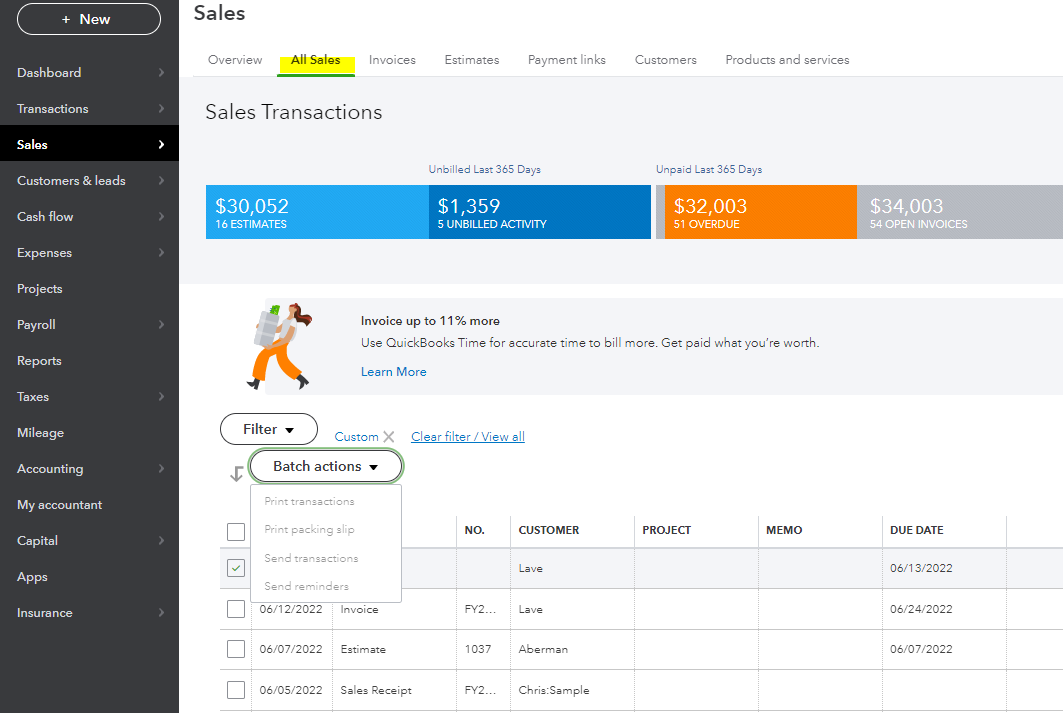
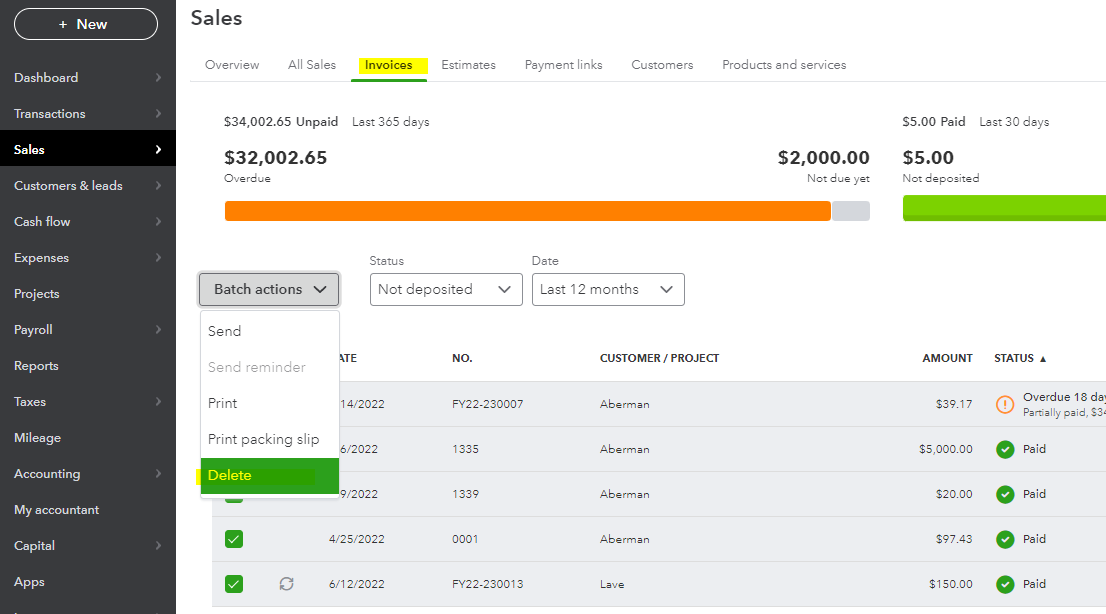
In the meantime, you're correct that you'll have to do it by hand. I know how convenient it is to delete the received payments by bulk.
In this case, I recommend sending feedback to our product developers to let them know this will help users deleting invoice payments faster. You can click the Gear icon on the top right and select Feedback under Profile. Then type your product suggestion and then hit Next to submit.
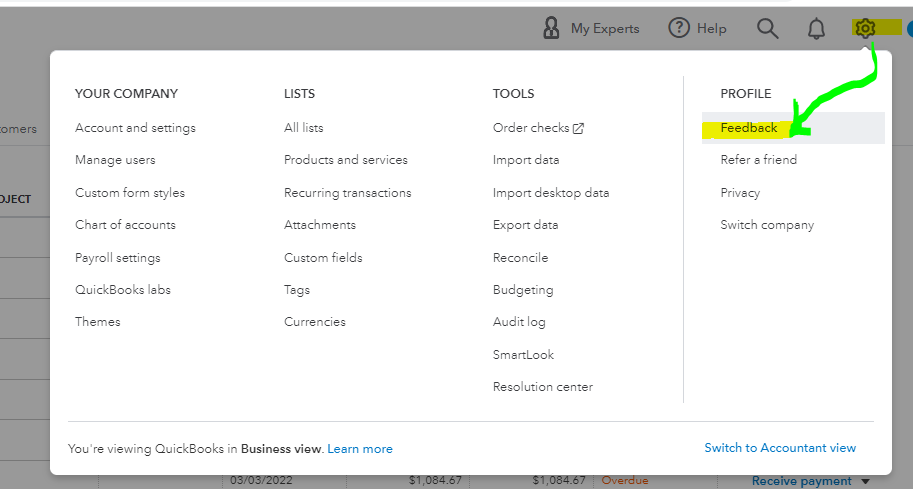
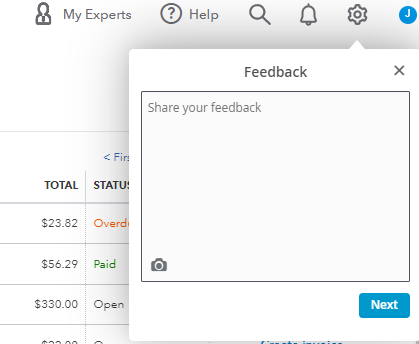
On the other hand, you can go to the Apps menu and search for an app like a deleter tool to remove payments transactions in QuickBooks Online. Please refer to this article for more details: Install and use apps.
To add up, you may check out these resources attached to learn more about the different ways of deleting sales transactions and recording them in QBO:
I'm only a post away if you have any other questions. Have a wonderful day!


You have clicked a link to a site outside of the QuickBooks or ProFile Communities. By clicking "Continue", you will leave the community and be taken to that site instead.
For more information visit our Security Center or to report suspicious websites you can contact us here


