Turn on suggestions
Auto-suggest helps you quickly narrow down your search results by suggesting possible matches as you type.
Showing results for
Get 50% OFF QuickBooks for 3 months*
Buy nowI have several reimbursements from empoyees that I need to handle from start to finish.. I have the receipt that recently gave me... I need to record the expense and pay them back via payroll.. How do I do that?
Thanks

Thanks for reaching out to the Community, Grimayoj.
You can reimburse employees in your payroll product. Initially, you'll need to create a reimbursement item.
Here's how:
If necessary, you can update your accounting preferences to confirm the reimbursement amounts post to their correct account. After adding your reimbursement pay type and making any needed changes, you'll be ready to reimburse the employee. When creating their paycheck, be sure to enter an amount in your Reimbursement field to include their reimbursement amount.
I've also included a detailed resource about reimbursing employees which may come in handy moving forward: Reimburse your employee
I'll be here to help if there's any additional questions. Have a great day!
Thank you but Im looking for the other entrees that need to be paid... The recording of the vendor that the employee paid the expense to.. and then subsequently how to tie that to the payment made to the employee for the reimbursement... I hear there is a different process if you pay them first before you record the expense and then a different process if you record the expense first then pay the employee..
Thanks
Seems every video I look at does employee reimbursements slightly different.. I just need to know the best way to do them... On the review expense claim screen it has payee and bank/cRedit... Is the payee the company the employee paid for whatever product they bought on behalf of the company.. And is the bank/credit his bank account? And then after you do that do you create an expense and what do you put on that screen where it says "Payee" again and then payment account...
Thanks
Hi there, @Grimayoj. I appreciate you getting back to the thread and submitting your additional questions about the employee reimbursements. I'd be happy to share some details about this matter.
Since you want to reimburse an employee in QuickBooks Online, let's record the expense for future payments through journal entry instead in the expense claim screen. I'd be glad to show you how:
Once done, you can then reimburse employees in your payroll product. Please follow the steps provided by ZackE.
For more information, check out this article: Reimburse an Employee in QuickBooks Online.
You may want to run payroll reports to gain insight into your company's finances and employee data. Visit this article to see the list and learn how to manage them: Run payroll reports.
If you have additional questions, don't hesitate to visit us again. We're available 24/7. Have a nice day!
Ok so I get the Journal entry but then where does the expense showing the vendor come into play.. I want to know how much I psend with certain vendors regardless of who paid for it at the time.. Also
Why isnt Expense claim the place to do it since Quickbooks came out with this method for employees to submit there expenses on...
Thanks
Can you do a print screen and point where things go..
Thanks
Hello there, @Grimayoj.
Allow me to elaborate or clarify things so you can get back to working order. When reimbursing an employee in QuickBooks Online (QBO), the Journal Entry is used to record the expense made by your employee's fund and not for your vendor. Once the Journal Entry is made, you can now pay your employee using a Check or Expense.
Here's how:
Kindly refer to the screenshots below for the reference of the process:
Create a Journal Entry: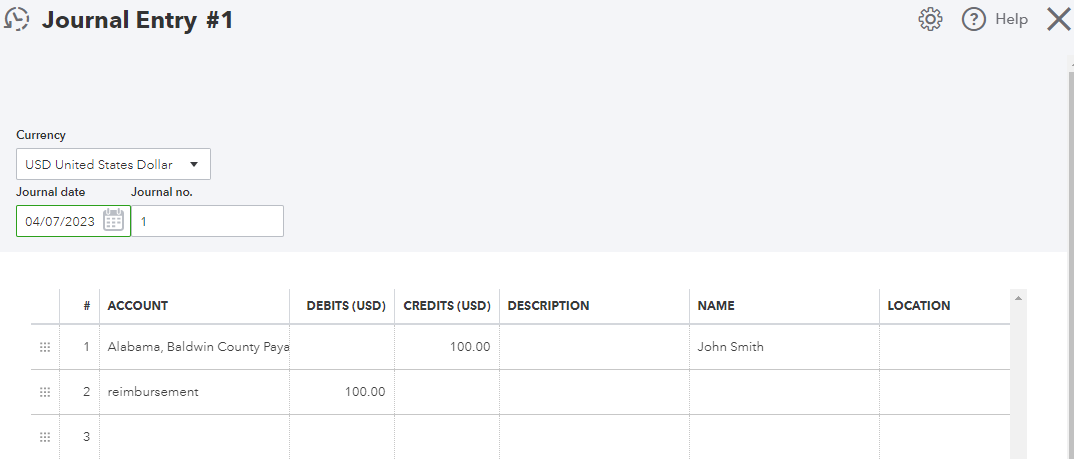
Once created, pay your employee using a Check or Expense: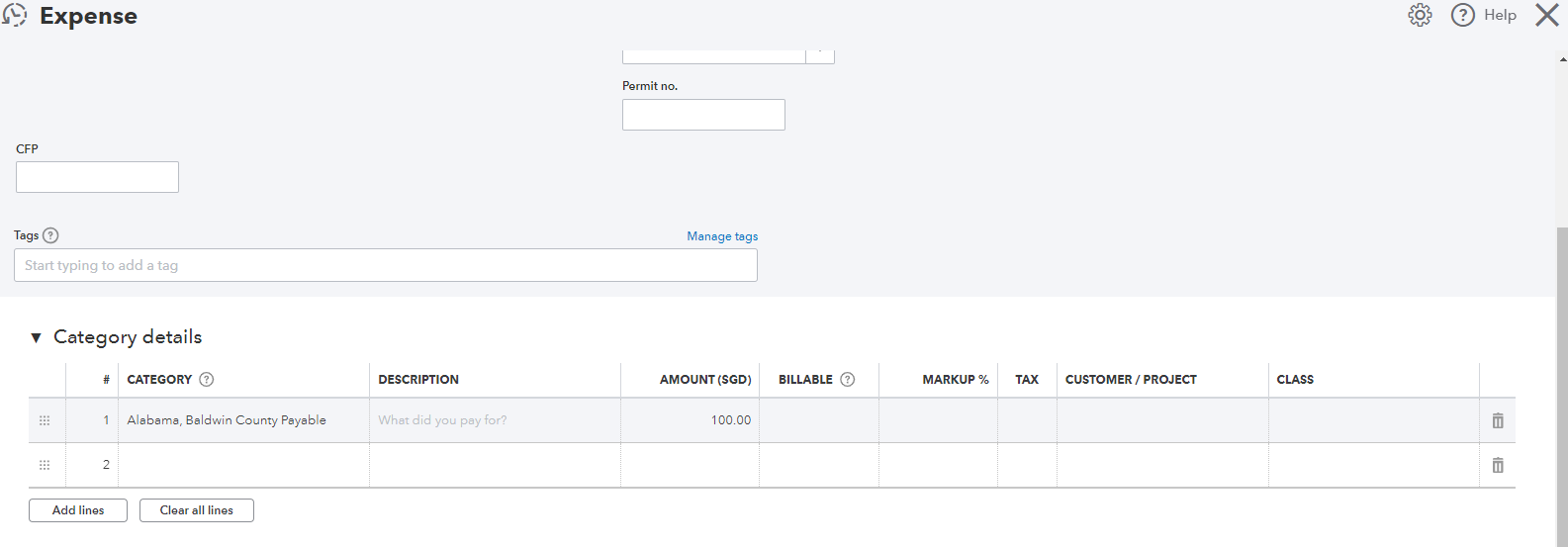
However, since you want to record the expense under the vendor's name, I recommend consulting your accountant to be guided accurately.
For detailed information, kindly visit: Reimburse an Employee in QuickBooks Online.
Moreover, I'll also share this article that can serve as your reference if you want to learn how to run basic business reports in QuickBooks: Run reports in QuickBooks Online.
Feel free to leave a reply if you require further assistance with reimbursing employees in QuickBooks. The Community team always has your back. Have a good one.
Im confused where in the second screen shot does it show recording a payment to the employee...
I may be confusing the situation... Here is my situation..
I have an employee who gave me two receipts that he/she paid for. Walmart for $200 and Meijer for $100.
Before putting it into QBO, I went into QBO payroll and put the reimbursement of $300 on a second pay check... So he/she has been reimbursed via QBO payroll on a second check... I need to now record whta I have done.. Im assuming I need to record the payment and the vendor payrment by the employee.. Im confused because both screen shorts have "Alabama Baldwin....."(Vendor) on them.. Dont see any employee information.Thanks
Hello, I'm looking to accomplish and better understand how to reimburse employee expenses for each month. Are moderators and support actively working this request? I see the last update was in April 2023.
In similar fashion to the OP, I have an employee who we reimburse each month for expenses and would also like to track the vendors to which each line item is paid. So when I create a New Transaction and select 'Bill' I create a line item for each of those expenses the employee has paid in the prior month. The check is manually made out to the employee but the line items I placed under that check I created do not link to the vendor 'Bill' I created. Like the OP, I think we're looking for the same solution and experiencing the same problem, we can't connect the two transactions to reflect one another. In addition, it adds duplicate bills so our QB account balance differs greatly from our actual bank balance. (If this requires a new thread, I'd be happy to start a new one)
Hi there, @bve86.I'd be glad to show you how to record and track your employee's reimbursement.
Currently, the option to record your employee's reimbursement per vendor link is unavailable. Alternatively, you can link the check transaction to a bill by changing the account type to Accounts Payable from the Category details.
Here's how:
To link the expense transaction to the bill:
For additional tips about bills and expenses, you can open these links:
To know more about how you can manage reimbursing your employee, check out this article: Reimburse your employee in QuickBooks Payroll
Don't hesitate to leave a comment if you need further assistance with reimbursing employees in QuickBooks. Have a good one.


You have clicked a link to a site outside of the QuickBooks or ProFile Communities. By clicking "Continue", you will leave the community and be taken to that site instead.
For more information visit our Security Center or to report suspicious websites you can contact us here


