Hi there, @Fayed11.
I'll walk you through retrieving your transactions in QuickBooks Self-Employed (QBSE).
Can you tell me what happened to your transactions? Were they mistakenly deleted or are they missing? In the meantime, we can manually enter or upload them. You can refer to these steps to manually enter them into the application:
- In your QBSE, click the Transactions tab from the left navigation panel.
- From there, click the Add Transaction button.
- Enter the transaction Date, Description, and Amount, and assign a transaction type.
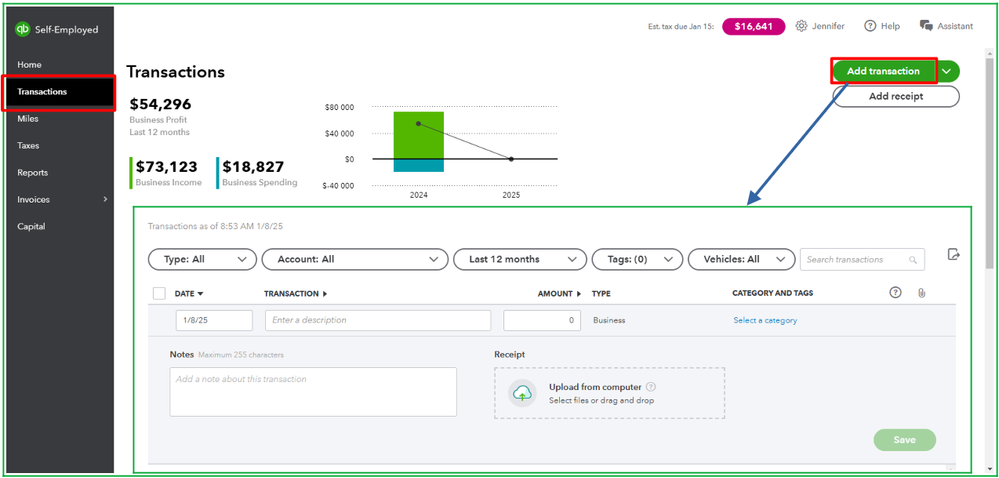
- You can add additional details you may have and hit Save to complete the process.
However, if you prefer to import them manually, you can see the steps below:
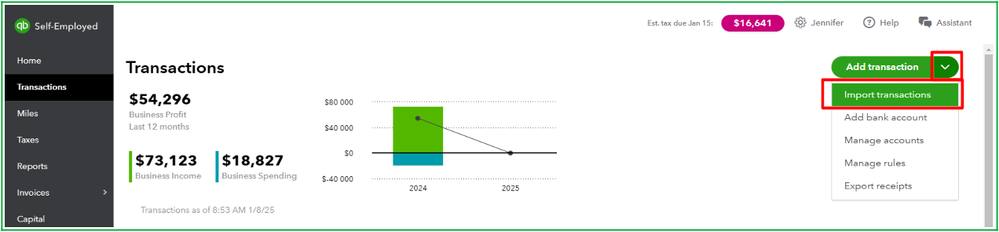
- From the Transactions window, click the dropdown arrow beside Add transaction.
- Choose Import transactions, and select Import older transactions for the account to which you want to add transactions.
- From there, click the Browse button and find the file you downloaded from your bank.
- Select the file and select Open to start the import.
- Review the column headers and data. Ensure the Date, Description, and Amount columns on the CSV match the columns and order in QuickBooks. The other column headers can be in any order.
- Select Continue to complete the import.
Additionally, you can read this article to learn how to categorize transactions for Schedule C: Schedule C and expense categories in QuickBooks Solopreneur and QuickBooks Self-Employed.
Feel free to return to this post if you have additional concerns about retrieving or managing transactions in QBSE, @Fayed11. We are open 24/7 to help you.




