Turn on suggestions
Auto-suggest helps you quickly narrow down your search results by suggesting possible matches as you type.
Showing results for
Get 50% OFF QuickBooks for 3 months*
Buy nowSolved! Go to Solution.

I've got you covered, userjorge.
After creating the expense account and recording the transactions for your gift card, you can map the accounts by following these steps:
Please see this sample screenshot for a visual guide:

You can use this article as a reference: Create and file 1099s using QuickBooks Online. If you need help with other task in QuickBooks, you can visit our general help topics page to view the articles and guides.
Please keep me posted here if there's anything else you need with your QuickBooks Online account. I'm always here to help. Take care!
If the gift was less than $25 then it is not taxable, otherwise, create an expense account called gift expense and use that, and map it to the 1099
Thanks Rustler for your advice. How do I link it to the 1099s? We gave a $100 gift card to three contractors.
I've got you covered, userjorge.
After creating the expense account and recording the transactions for your gift card, you can map the accounts by following these steps:
Please see this sample screenshot for a visual guide:
You can use this article as a reference: Create and file 1099s using QuickBooks Online. If you need help with other task in QuickBooks, you can visit our general help topics page to view the articles and guides.
Please keep me posted here if there's anything else you need with your QuickBooks Online account. I'm always here to help. Take care!
How do I do this in QB Desktop?
Welcome to the Community, WA12. This thread covers how to record a holiday gift card for a contractor as part of their total compensation in QuickBooks Online.
For QuickBooks Desktop, start by creating a dedicated expense account for tracking the gift. Here's how:
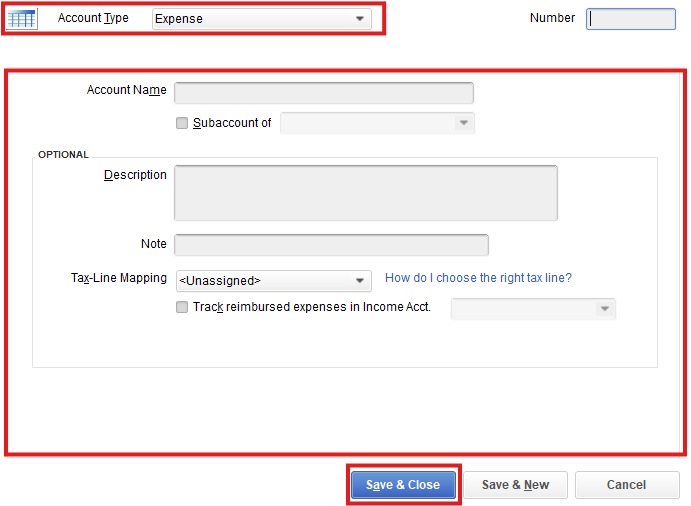
Next, write a check to the contractor affecting this expense account. Be sure to include it in the 1099 mapping so the gift is reflected in their total compensation.
This discussion remains open if you have any additional questions.


You have clicked a link to a site outside of the QuickBooks or ProFile Communities. By clicking "Continue", you will leave the community and be taken to that site instead.
For more information visit our Security Center or to report suspicious websites you can contact us here


