The data shown in your quarterly reports is based on the transactions you’ve entered or categorized in QuickBooks Solopreneur, @Redrocksfour.
First, could you clarify which specific quarterly report you’re trying to generate? To gain a clear idea of your situation and provide more guidance on understanding the report.
Building on this, please note that the data shown in any reports is entirely based on your QB Solopreneur transactions. To ensure the report's accuracy, I recommend reviewing your transaction categories and confirming that none are categorized as Contract Labor, as this can cause contractors to appear in your reports.
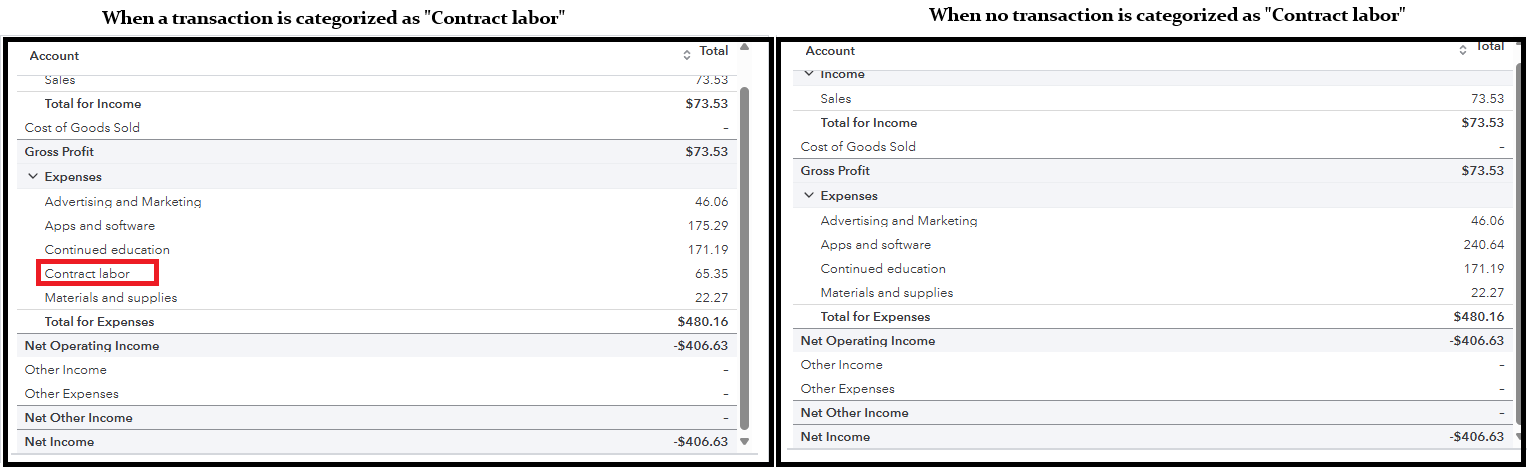
Here's how to check:
- In the left-hand panel, click Transactions.
- Review the list of bank transactions to check your entries.
- If you need to change a category, simply click on the current category and select a new one from the list.

This thread will remain open for questions or clarifications regarding reports in QB Solopreneur. We're always here to help.




