Turn on suggestions
Auto-suggest helps you quickly narrow down your search results by suggesting possible matches as you type.
Showing results for
Get 50% OFF QuickBooks for 3 months*
Buy now
I too was looking for a Classic View default option. Modern view to difficult, cuts off numbers, and is annoying. Modern view is not an improvement. I hope that you will listen to your customers.
Hi there, billing.
I'm glad that you brought this up to us. It's worth letting us know what our customers value and prefer flexibility.
Currently, a setting that can make Classic View the default for reports in QuickBooks Online is unavailable. You can only manually toggle to Classic View using the switch at the top of the report each time you run a report.
Here's how:
1. On the report page, click on the three dots located on the upper right corner.
2. Select Switch to classic view.
3. When prompted, confirm and click on Switch to classic.
Please note that what you customized and saved a report while in Classic View, should retain that view preference when you reopen that specific report.
If you have any additional questions, please don’t hesitate to reach out. We're always here to assist you.
I have always been able to export the classic view into excel and then use that file as a data file to create reports in a format that I want using VLookup. This does not work with the modern view. I am going to have to redo all of my reports which is a ton of work. I would like to at least have the option to toggle back to the classic view when needed.
Hello there, Julieagilmore.
I understand the importance of the classic view for exporting data and creating reports using Excel and VLookup. QuickBooks Online’s modern view offers enhanced features for improved functionality. Let me share the reports that still support the classic view.
Switching back to the classic view in QuickBooks Online depends on the type of report you’re using. Below is a list that allows switching to the classic view, along with instructions on how to do it:
Standard reports supporting classic view:
Here’s how to switch from classic view:
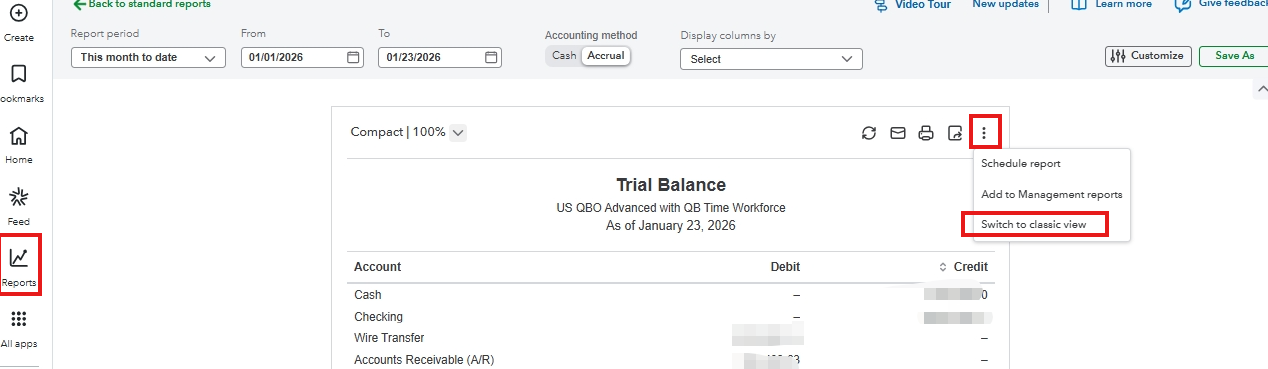
For custom reports, QuickBooks Online currently doesn't offer an option to revert to the classic view after they have been saved in the modern format. As a workaround, you can follow these steps:
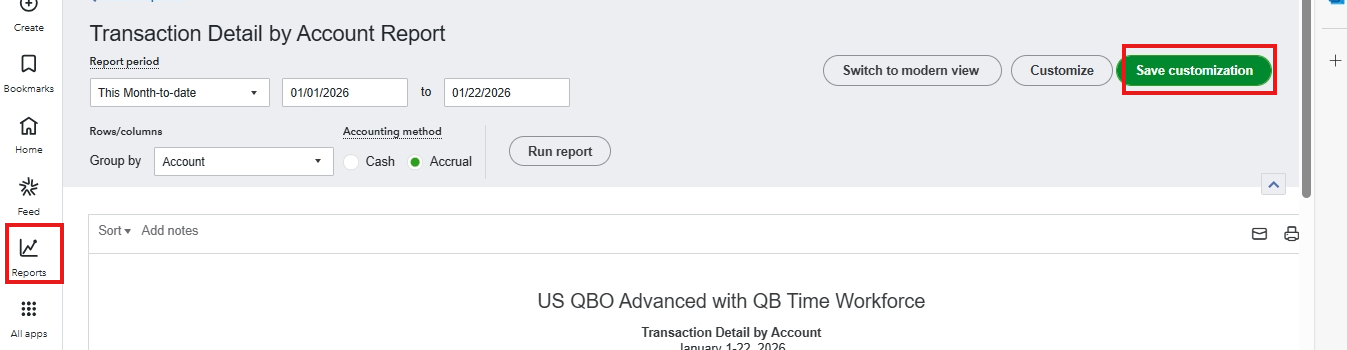
For additional concerns, reply below. We’re here to help.


You have clicked a link to a site outside of the QuickBooks or ProFile Communities. By clicking "Continue", you will leave the community and be taken to that site instead.
For more information visit our Security Center or to report suspicious websites you can contact us here


