Hi there, Lilli. I'm glad to assist you today in transferring your money from the envelope to your QuickBooks Checking account.
First, allow me to discuss some context about how Envelopes in QuickBooks work. In QuickBooks, the envelope feature makes it simple to set money away for upcoming costs. To prevent unintentional spending, money in envelopes is purposefully kept apart from money in your QuickBooks Checking account. This is a simple method of proactive saving that will ensure you have the funds necessary to manage your business.
Since you want to transfer your money from the envelope to your QuickBooks Checking account, you just have to follow these steps I've narrowed down for you:
- Sign into QuickBooks then go to the Cash Flow menu.
- Select Banking Services then select QuickBooks Checking.
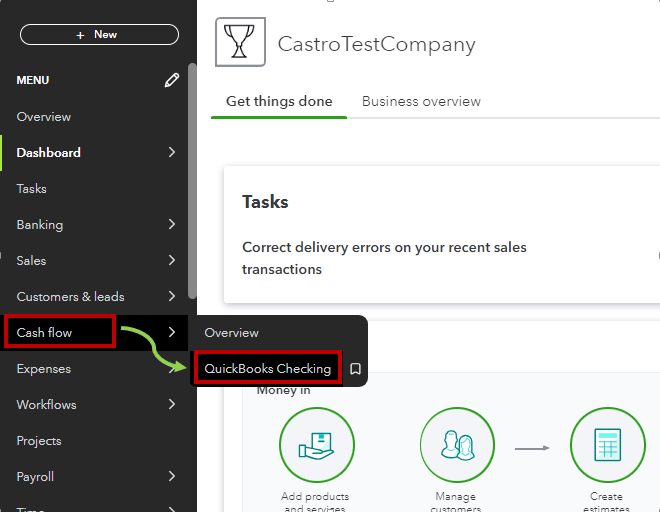
- Select the envelope you want to take money out of from the Envelopes section.
- Select Get or send money and enter the amount you want to take out of your envelope.
- Ensure to select the correct envelope in the From field.
- In the To field, choose your QuickBooks Checking account.
- Enter the amount you want to take out of your envelope then select Next.
- Click on Continue when the transfer request finishes.
Your funds have been restored to your QuickBooks Checking account. It can be used to cover your objective, transferred to a related account, or placed in a different envelope.
You can check out this article for more information about the process and to know how to manage your envelopes: Create envelopes to set your funds aside with QuickBooks Checking.
Furthermore, although QuickBooks has the capacity to automatically categorize as many of your QuickBooks Checking transactions as possible, it is unable to do so for all of them. To categorize your transactions, you must periodically check your Banking menu. Feel free to read this post I have for you: Categorize online bank transactions in QuickBooks Online, to assist you in reviewing and classifying your QuickBooks Checking transactions.
Please don't hesitate to ask any questions along the way. I'm committed to making sure you feel confident and empowered in managing your finances in QuickBooks Online. Our dedicated team is ready to provide the support you need to ensure you get the assistance you need. Take care.




