Get 50% OFF QuickBooks for 3 months*

Buy now
cancel
Showing results for 
Search instead for 
Did you mean: 
Announcements
Simplify payday and set payroll to run automatically on QuickBooks. Explore QuickBooks Payroll
Reba-Smith
Level 1

I'm viewing P & L report. I chose an expense class (60200 auto exp). I click on amount & bring up transactions. Can't get all columns to show and won't let me tab??

I have 10 columns that should display but they don't. So I tried tabbing but it won't move across the screen for me to see other columns in the expense. How can I change "margins", etc to view all columns.

1 Comment 1
KayePe
QuickBooks Team

I'm viewing P & L report. I chose an expense class (60200 auto exp). I click on amount & bring up transactions. Can't get all columns to show and won't let me tab??

Please know that you can't change or modify the margins, but you can adjust your screen size to view all columns in your QuickBooks Online, Reba. 


You can use the keyboard shortcuts to zoom in or out:


  • Zoom in: Ctrl and +
  • Zoom out: Ctrl and -


Alternatively, you can also use the horizontal scroll bar to move sideways and view additional columns in the expense table.
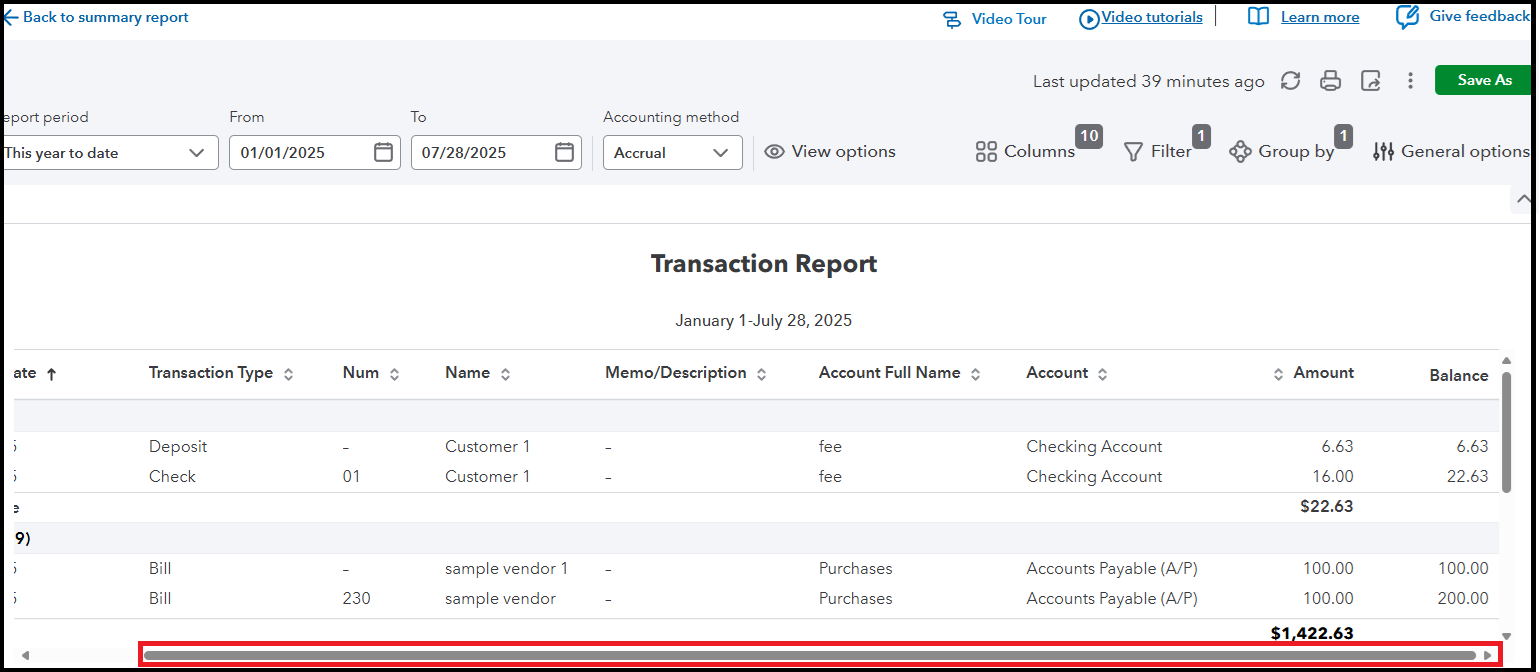


We're always here if you need further assistance running a report in QBO. I'll keep this thread open for your future reference.


Need QuickBooks guidance?
Log in to access expert advice and community support instantly.

Need to get in touch?

Contact us