Turn on suggestions
Auto-suggest helps you quickly narrow down your search results by suggesting possible matches as you type.
Showing results for
Get 50% OFF QuickBooks for 3 months*
Buy now
Hello @mathprocorp-gmai,
Welcome to the Community. I'm here to help you set up automatic payments in QuickBooks Online.
Currently, the option to send a link to fill in the credit card information automatically is unavailable. As a workaround, you send your customer an authorization form for you to set up a recurring payment.
This way, you can enter the details manually and ensure it matches the form coming from your customers. You can use this feature as long as you have a QuickBooks Payments account.
To download the form, here's how:
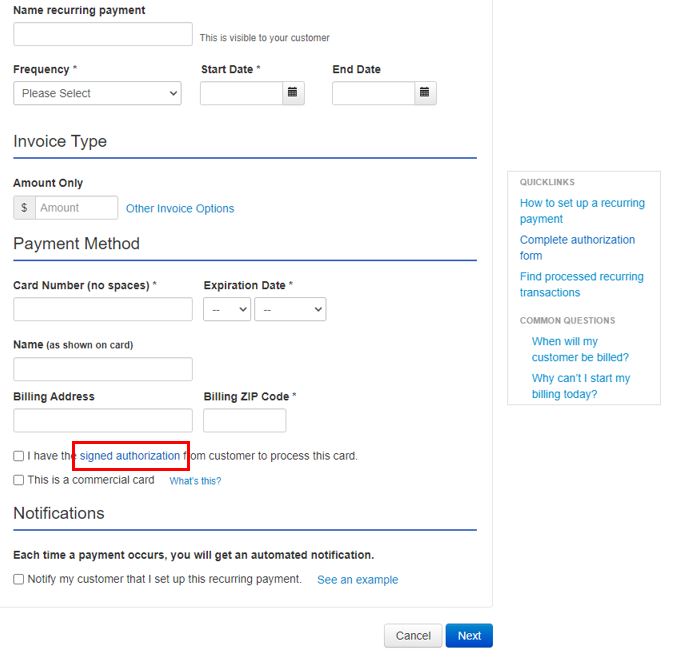
After a customer completes the form, you can proceed with the recurring payment setup. You can follow these steps:
Payments should subtract automatically from the customer's account moving forward. Ensure the details matches the authorization form to avoid issues.
For additional reference, I've attached a link you can visit to know more about what time of the day are charges processed for the payments: Recurring Credit Card Payment FAQs.
Get back to me if you have additional questions about the features available for accepting customer payments in QuickBooks. I'm always here to help. Take care always.
Another option, consider having an additional app with the payment portal feature for your customers and integrate it with your QBO account. Your customers can monitor their billings, payment history, or update their payment details.


You have clicked a link to a site outside of the QuickBooks or ProFile Communities. By clicking "Continue", you will leave the community and be taken to that site instead.
For more information visit our Security Center or to report suspicious websites you can contact us here


