Turn on suggestions
Auto-suggest helps you quickly narrow down your search results by suggesting possible matches as you type.
Showing results for
Get 50% OFF QuickBooks for 3 months*
Buy nowIf there is a way to link a specific account to an invoice upon creation when no account is explicitly set, rather than using the default, please let me know.
Solved! Go to Solution.

Linking invoice accounts depends on how you handle them in QuickBooks, woatm74. Let’s explore some scenarios that can address your needs effectively.
If you want to determine which account these invoice payments are deposited into, you can verify your QuickBooks Payments setup, as payments automatically transfer to the bank account you registered during signup. To review and update the payment method, follow the steps below:
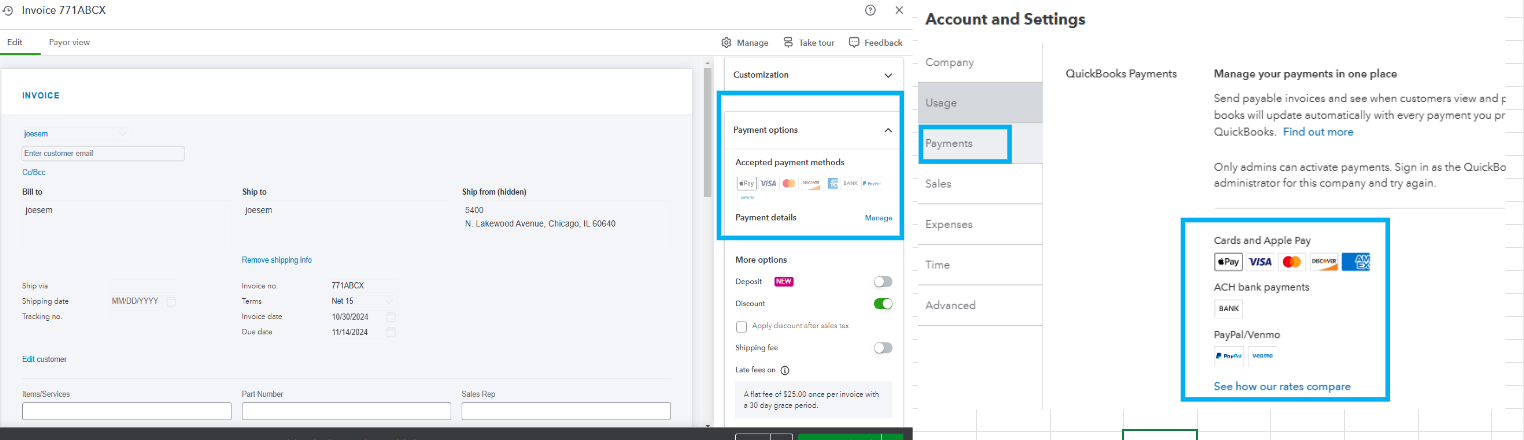
To guide you in accepting online payments for online and in-person sales with QuickBooks Payments, open this article: Receive and process payments in QuickBooks Online with QuickBooks Payments.
On the other hand, if you're referring to the income account when creating an item in the Products and Services section, this will depend on your setup and how you incorporate it into your invoice. For more details on how to add an item, see this link: Add product and service items to QuickBooks Online.
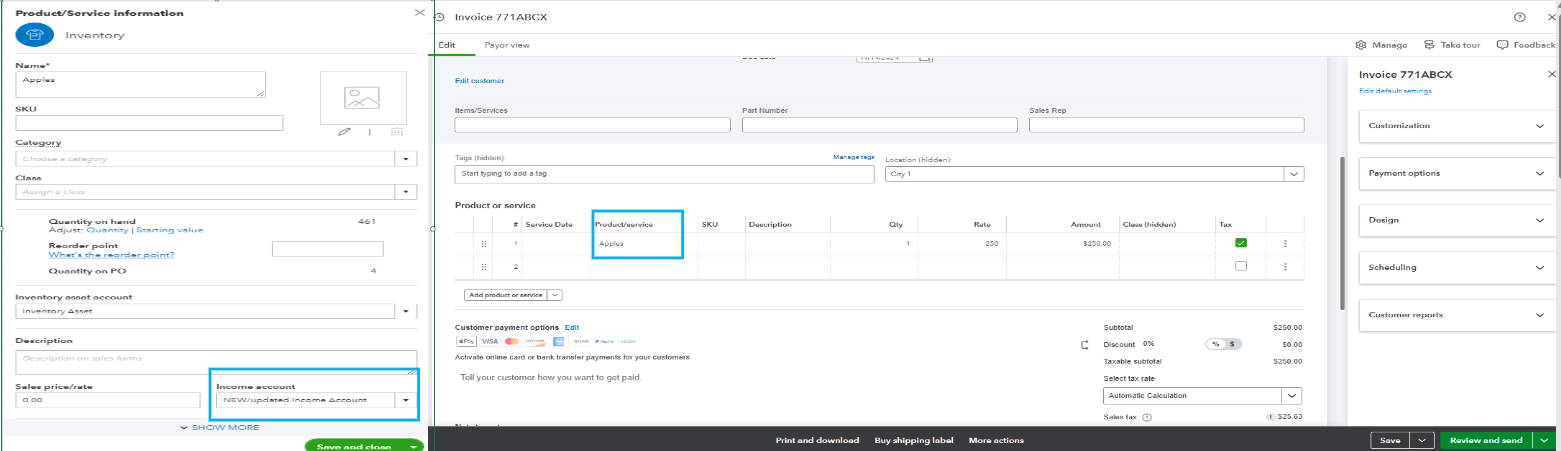
However, if you meant something different, please let me know, and I will provide an appropriate solution.
Additionally, I'll be sharing these links that will guide you in setting up automatic payments for recurring invoices and how to deposit them into your bank account:
If you have questions about invoices or need assistance with your QuickBooks account, please leave a comment below. I'm here to help you.
Linking invoice accounts depends on how you handle them in QuickBooks, woatm74. Let’s explore some scenarios that can address your needs effectively.
If you want to determine which account these invoice payments are deposited into, you can verify your QuickBooks Payments setup, as payments automatically transfer to the bank account you registered during signup. To review and update the payment method, follow the steps below:
To guide you in accepting online payments for online and in-person sales with QuickBooks Payments, open this article: Receive and process payments in QuickBooks Online with QuickBooks Payments.
On the other hand, if you're referring to the income account when creating an item in the Products and Services section, this will depend on your setup and how you incorporate it into your invoice. For more details on how to add an item, see this link: Add product and service items to QuickBooks Online.
However, if you meant something different, please let me know, and I will provide an appropriate solution.
Additionally, I'll be sharing these links that will guide you in setting up automatic payments for recurring invoices and how to deposit them into your bank account:
If you have questions about invoices or need assistance with your QuickBooks account, please leave a comment below. I'm here to help you.


You have clicked a link to a site outside of the QuickBooks or ProFile Communities. By clicking "Continue", you will leave the community and be taken to that site instead.
For more information visit our Security Center or to report suspicious websites you can contact us here


