Turn on suggestions
Auto-suggest helps you quickly narrow down your search results by suggesting possible matches as you type.
Showing results for
Get 50% OFF QuickBooks for 3 months*
Buy nowWhen I create a new invoice, the attachment below is not checked as "attach to email." I always have to click on the checkbox to attach the document to the invoice. However, I have several invoices and I want to know if there is a way to automatically check the attachment file by default.

Thank you for visiting the Community today, DeveloperIntTX.
The functionality to automatically check the Attachments feature for transactions is currently unavailable. Integrating the automation feature into the application saves time and benefits a large number of users. I recommend sending this product suggestion directly to our engineers for consideration in future enhancements.
Here's how:
You can visit the QuickBooks Blog to keep in the loop on the latest releases, and product updates. Also, the Community page contains a list of topics and tools to help complete your accounting tasks on time. Simply choose the article that best addresses your concern.
Reach out to me again if you have other product-related concerns or additional questions about the Attachments function. I'm always ready to lend a helping hand. Enjoy the rest of the day.
I'm in the same boat. We do hundreds of invoices and it takes hours to individually upload the attachment and then have to check the box. This is very error-prone, so I hope there is a solution to this soon enough
Any update on this. Seems like a no brainer for 2025. Maybe Xero has the option?
Hello, @thecraneman.
I understand how challenging it is to manually check the Attachment to email for every invoice. At the moment, there isn’t a way to make that checkbox attach by default, so you’ll need to select it each time.
For now, I still encourage you to send feedback so our product team can consider applying this in the future update.
Here's how:
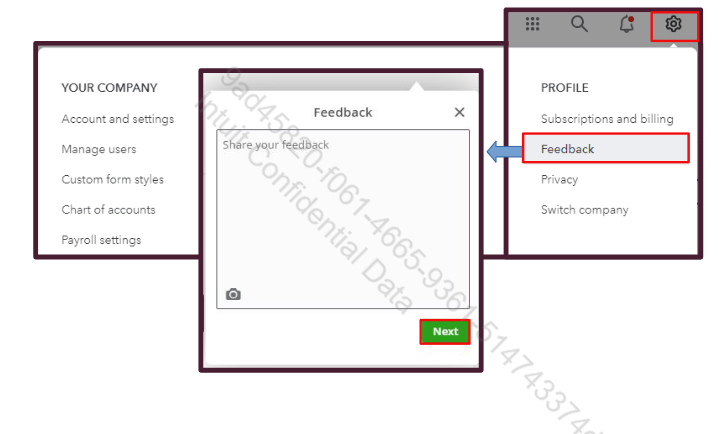
Let us know if you have further questions, and we'll be right here to help you anytime.


You have clicked a link to a site outside of the QuickBooks or ProFile Communities. By clicking "Continue", you will leave the community and be taken to that site instead.
For more information visit our Security Center or to report suspicious websites you can contact us here


