Turn on suggestions
Auto-suggest helps you quickly narrow down your search results by suggesting possible matches as you type.
Showing results for
CYBER MONDAY SALE 70% OFF QuickBooks for 3 months* Ends 12/5
Buy nowHello - I'm trying to get a report in Quickbooks Desktop enterprise that shows customer payments AND the customers payment terms. We are manufacturing and need to communicate to our shipping team that payments have been made for customers that have been on hold until payment is received. I've created a report that shows the terms field but it does not carry over the terms for the customer. Any advice would be appreciated.

Thank you for providing the details of your situation, jloomy. Let me guide you through the steps to generate the appropriate report in QuickBooks Desktop that aligns with your needs.
To begin with, could you clarify which report you are currently generating that shows the terms field, but it doesn't carry over the terms for the customer?
If the current report isn’t pulling the Terms data, you can run a Custom Transaction Detail report and customize it to show the terms field and payment information. Please note that the Terms field only appears for invoice transactions, so you’ll want to ensure Invoices are included along with Payments and Deposits in the report.
Here's how:

If the Terms field is still not showing, confirm that each customer's profile has the correct payment terms set up.
You can leave a comment below if you have additional questions.
Thank you for this. I created the custom report as you've suggested and now need to know how to condense the data so that only the invoice total, customer name, terms and paid/unpaid status.
Thank you for following up, and great job on creating the custom report, jloomy.
I’m happy to help you condense the data further by removing the additional columns in the Custom Transaction Detail Report. This will help you streamline your report by keeping only the columns you need, such as invoice total, customer name, terms, and paid/unpaid status.
Here are the steps to remove any unnecessary columns from your report:
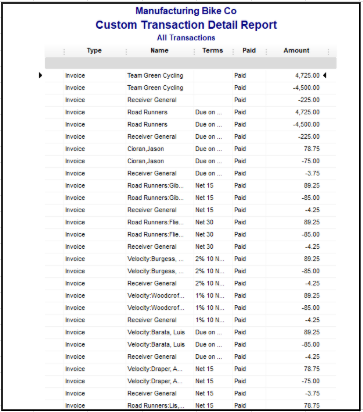
Let us know if you need further assistance while customizing your report, and we'll be happy to help.
Thank you so much. We migrated to Online Advanced over the weekend and unfortunately, our memorized reports did not come over. Can you please walk me through how to create this same report in QB Onilne?
Thanks for following up with the Community, jloomy
To verify my understanding, which exact reports are you trying to create in QuickBooks Online Advanced?
If you still need ones showing deposits and payments, you can consider running your Total Deposits and Payments, or Deposit Detail reports. For a detailed list of other available reports, you can check our Reports included in your subscription article.
As for customizing columns and data displayed on the report, you can customize reports after running them. This can help to show specific data you want displayed on your report. You can also save custom reports so you can run them in the future.
If you're unable to make a report display how you'd prefer to in QuickBooks, you can consider exporting it and customizing it further outside of your books.
I'll be looking forward to your reply. Have a wonderful Tuesday!


You have clicked a link to a site outside of the QuickBooks or ProFile Communities. By clicking "Continue", you will leave the community and be taken to that site instead.
For more information visit our Security Center or to report suspicious websites you can contact us here


