Turn on suggestions
Auto-suggest helps you quickly narrow down your search results by suggesting possible matches as you type.
Showing results for
Get 50% OFF QuickBooks for 3 months*
Buy nowI voided 2 sales receipts in Quickbooks for 2025 that had previously been reconciled, and I created two new sales receipts to match the date and amount. How do I re-reconcile these new sales receipts? I need clear step by step instructions. Thank you.
Solved! Go to Solution.

Thanks for the update, @JChambreau. It's good to know that your reconciliation balance is now showing zero.
Concerning the sales receipts you created, you can now proceed with deleting them in QuickBooks to avoid duplicate copies of these entries.
You can always return here if you have additional questions. We're here to assist you promptly.
Hi Chambreau,
When you void a previously reconciled sales receipt, QuickBooks marks it with a "D" (for deleted) in the reconciliation, and you'll need to re-reconcile the new sales receipts to replace the voided ones.
Here's how to re-reconcile the new sales receipts:
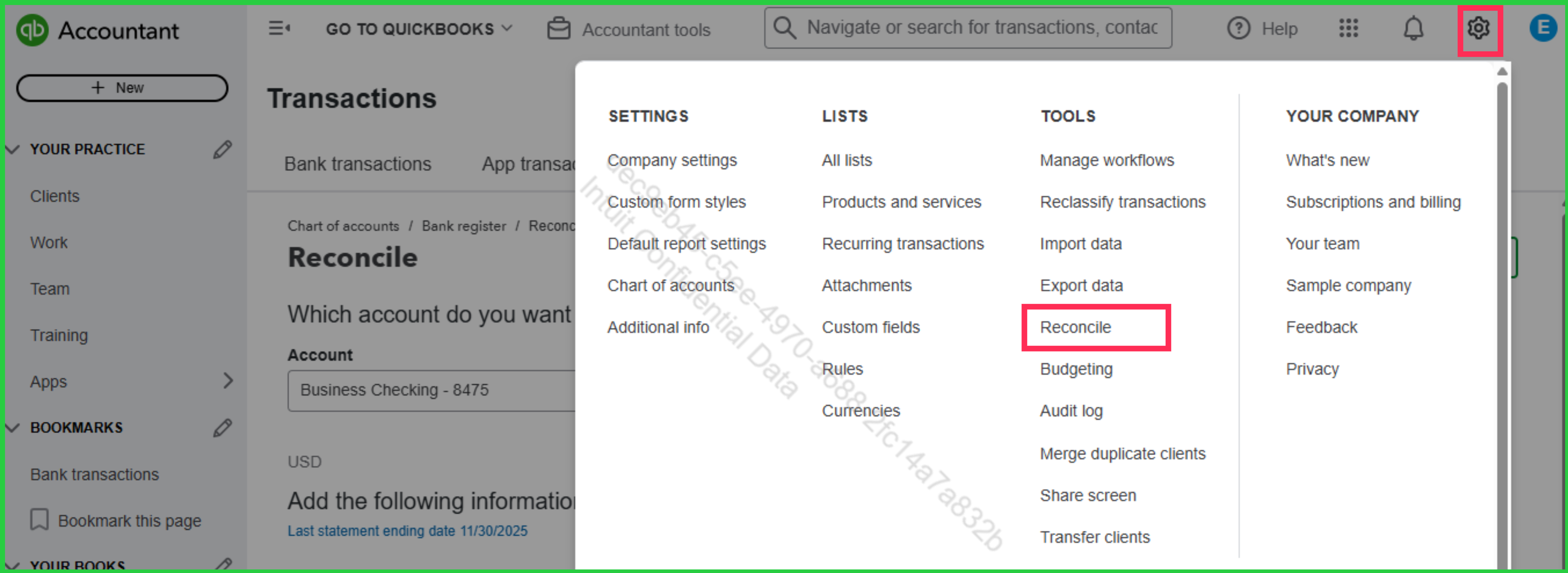
Quick tip: If you don't see the new sales receipts in the reconciliation window, double-check that their dates fall within the statement period you're reconciling and that they were deposited to the correct account.
If you have any questions, feel free to leave a comment in the thread.
Hello, Thanks for the instructions.
I tried that yesterday, and again today.
I voided 2 transactions, one for Feb 2025, one for April 2025. So I went to reconcile the February payment first.
This is what is now appearing on the screen. It is showing the old transaction, and the new transaction. The checked one is the new.
As you can see, no other February transactions are appearing, just the voided and the new one. It is showing a negative in the reconciliation amount, and I am unable to save and move forward. Please help.
Thank you for sharing an update and screenshot, @JChambreau.
When you void transactions in QuickBooks, they will be marked as Voided in the Memo field of your reconciliation records. While this won't affect your bank balance, it will still appear on the screen because it was part of a previous reconciliation.
To ensure all February 2025 transactions display accurately in the reconciliation screen, please double-check that the Statement ending date matches the period on your bank statement. Otherwise, you can click the Funnel icon in the Reconciliation page to filter February transactions.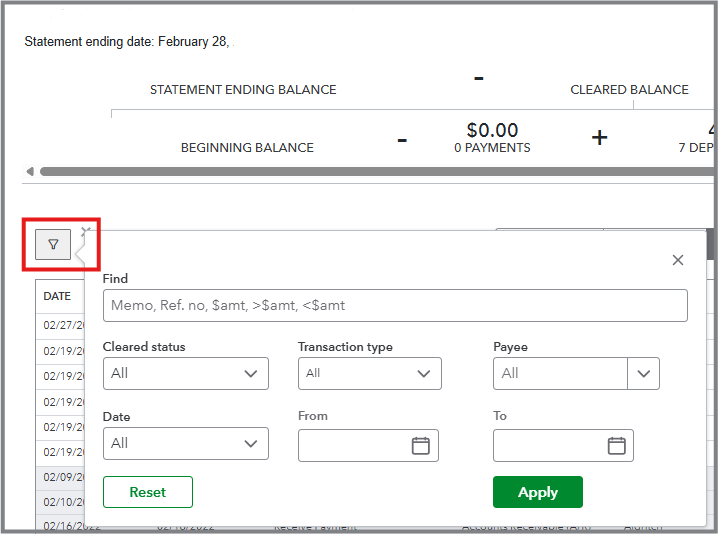
After that, proceed to match the transactions with your bank statement, and ensure that the opening, beginning, and ending balances are correct so that the difference is zeroed out.
I'm still open to your replies if you have further questions. I'm here to help.
Hello, I followed the instructions but the screenshot I took remains the same. When I click the funnel, it only shows the 2 voided transactions, plus other unreconciled transactions for all other months/years, and not the reconciled February transactions.
How do I see all February 2025 transactions and re-reconcile that month?
I had already reconciled the entire 2025 year before I voided the 2 transactions.
On the reconcile page, it states that my beginning balance is off by -$167.95 (the total of the 2 replacement sales receipts for the voided transactions). When I press the "We can help you fix it", it only leads me details for the two voided transactions, which doesn't help me one bit. I have been following the AI in quickbooks to help with these 2 transactions, and it is just making things worse for me.
To be clear, the two voided deposits were payments from Stripe. The replacement transactions are sales receipts. Does this create an issue? Should I just delete the two new sales receipts and start over in a different way?
Can I undo the voided the original deposit transactions?
Hi, @JChambreau.
I appreciate your effort for sticking with this and for the additional information. You've done the right steps so far, but what you're seeing is actually expected behavior in QuickBooks after voiding already reconciled transactions. There are two ways to get everything back on track.
Option 1: We can help you fix it feature
Use this feature to fix the difference in your account while keeping the record of the voided transaction.
Here's how:
Option 2: Delete and re-create the voided transactions
Use this only if you prefer to completely remove the voided entries from your register.
How to delete
Recreate the two sales receipts using the same date, amount, and deposit account as the originals. After recreating them, you must reconcile them manually.
When you return to the reconciliation page, your beginning balance will be fixed.
If you have follow-up questions, please don't hesitate to click the Reply button.
Thanks for the update, @JChambreau. It's good to know that your reconciliation balance is now showing zero.
Concerning the sales receipts you created, you can now proceed with deleting them in QuickBooks to avoid duplicate copies of these entries.
You can always return here if you have additional questions. We're here to assist you promptly.


You have clicked a link to a site outside of the QuickBooks or ProFile Communities. By clicking "Continue", you will leave the community and be taken to that site instead.
For more information visit our Security Center or to report suspicious websites you can contact us here


