Hi there, @jblack49.
Being able to delete a picklist in the Pick tab would be helpful. Having this option would allow you to update errors when situations like yours happen.
I encourage you to add your vote for this one by sending a feature request in the Feedback section within QuickBooks. Our product development team reviews all the feedback we receive to ensure we’re meeting the needs of our customers.
Here's how:
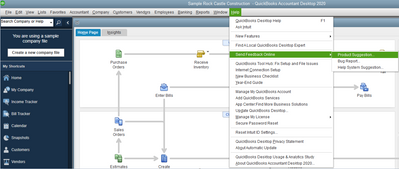
- Go to the Help menu.
- Choose Send Feedback Online and select Product Suggestion.
- Click the Product Area drop-down menu and select a category.
- Enter your comments or product suggestions.
- Select Send Feedback.
If you need more help working on the fulfillment worksheet, check these articles:
If you have any other questions, just let me know and I'll be happy to help. Thanks again for reaching us and have a good day, @jblack49.




