You've come to the right place for assistance, @Jds135. I'll be happy to outline the steps on how to void an accidentally cleared check in QuickBooks Desktop (QBDT).
Before voiding, let's un-clear the check in the register to prevent discrepancies in your account balances and financial reports. Here's how:
- Go to Banking and select Use register.
- Choose the account where the check was posted.
- Locate the transaction and click on the check icon to un-clear it. Select Yes to confirm.
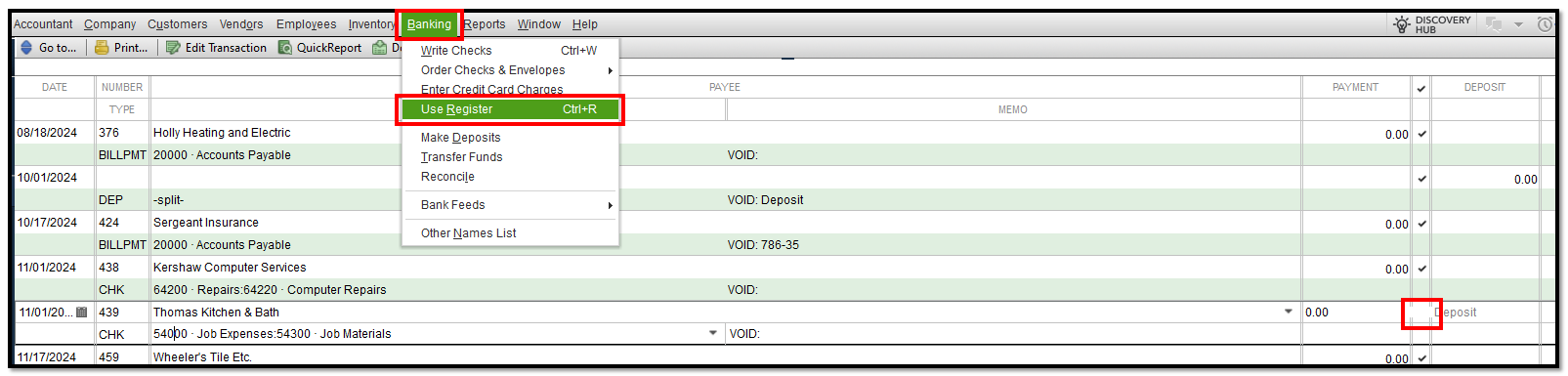
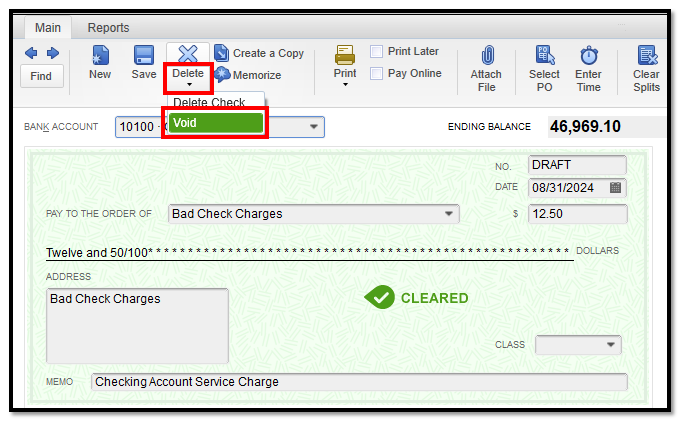
- When the checkmark is removed, double-click on the check transaction to open its details.
- Click the Delete dropdown and select Void.
Additionally, you may save time paying a vendor regularly by setting up an automatic recurring payment check in QBDT.
Let me know in the comments below if you have additional questions about voiding a check. We're always around to assist you further. Take care and have a wonderful day!




