Turn on suggestions
Auto-suggest helps you quickly narrow down your search results by suggesting possible matches as you type.
Showing results for
Get 50% OFF QuickBooks for 3 months*
Buy nowI sold my business, so I want to close out Quickbooks. what reports should i create before i turn it off?
Solved! Go to Solution.

It's my priority to ensure you'll be able to keep a handy copy of your data, @KCEnterprise.
You can export your reports by downloading your reports, list, and other data from QuickBooks Online. By doing so, you'll be able to save them to your local hard drive. I'll show you how.
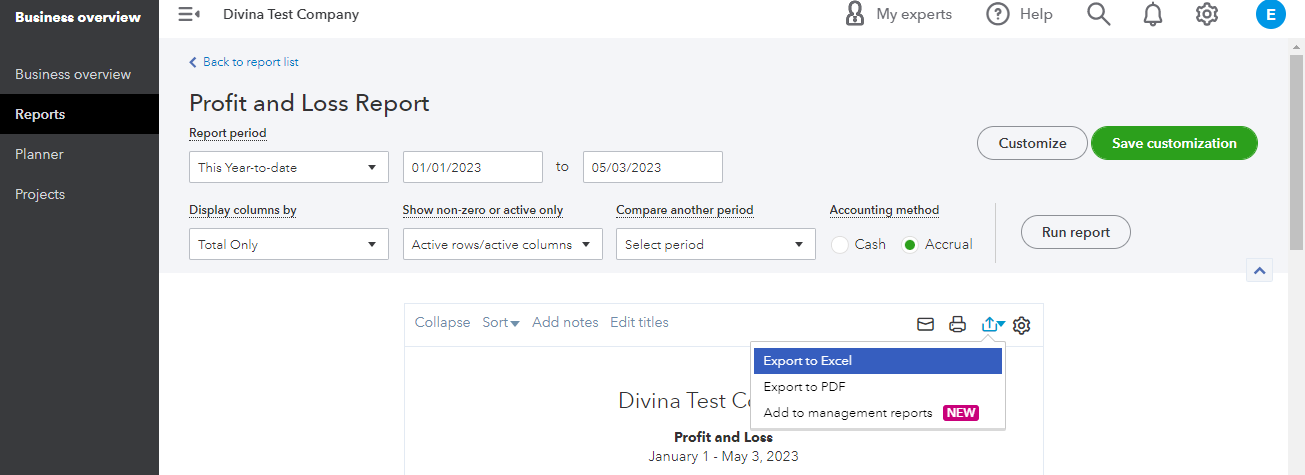
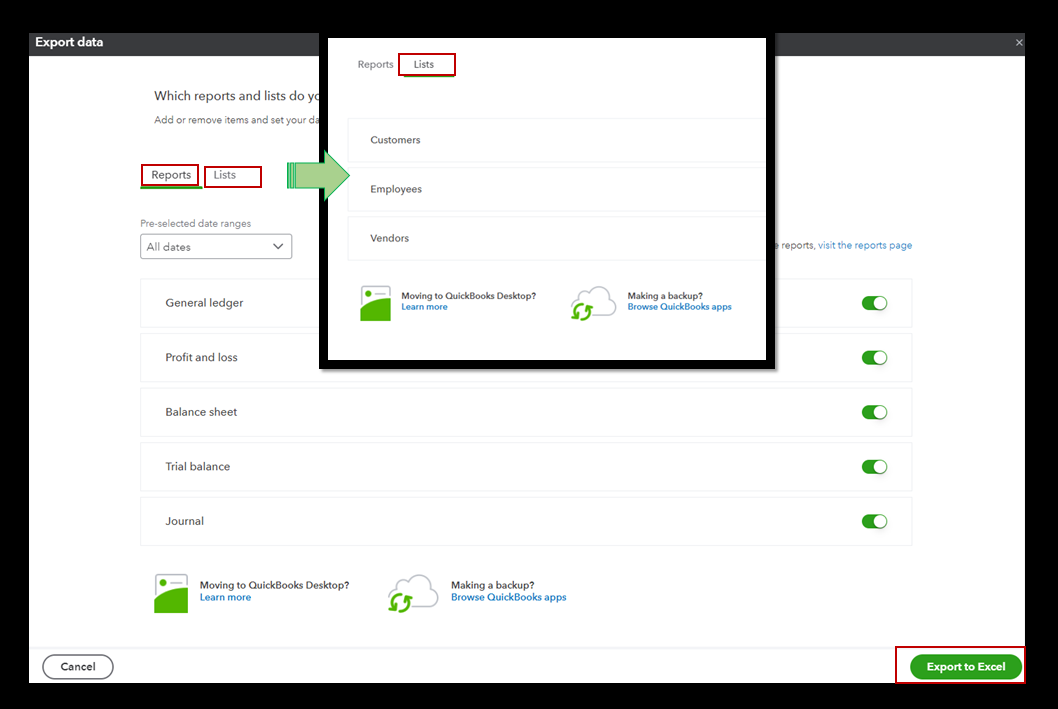
Also, you can export lists, reports, non-posting transactions, and attachments in the only program. It only takes a few clicks to do this in your company. Here’s how:
Need data that isn’t found in basic reports? You can create custom reports to get the data that matters to you most.
Also, the non-posting transactions won't be included once you exported your reports and lists. To export them, I'd suggest checking out this article: Download your Data from QuickBooks Online.
Feel free to get back to us. If you have any other concerns or questions about your progress in saving all your data. I’ll be around to help and ensure you are taken care of. Have a great day ahead.
It's my priority to ensure you'll be able to keep a handy copy of your data, @KCEnterprise.
You can export your reports by downloading your reports, list, and other data from QuickBooks Online. By doing so, you'll be able to save them to your local hard drive. I'll show you how.
Also, you can export lists, reports, non-posting transactions, and attachments in the only program. It only takes a few clicks to do this in your company. Here’s how:
Need data that isn’t found in basic reports? You can create custom reports to get the data that matters to you most.
Also, the non-posting transactions won't be included once you exported your reports and lists. To export them, I'd suggest checking out this article: Download your Data from QuickBooks Online.
Feel free to get back to us. If you have any other concerns or questions about your progress in saving all your data. I’ll be around to help and ensure you are taken care of. Have a great day ahead.
As an additional option, convert your data to a QB Desktop file format.


You have clicked a link to a site outside of the QuickBooks or ProFile Communities. By clicking "Continue", you will leave the community and be taken to that site instead.
For more information visit our Security Center or to report suspicious websites you can contact us here


