Turn on suggestions
Auto-suggest helps you quickly narrow down your search results by suggesting possible matches as you type.
Showing results for
SALE EXTENDED 70% OFF QuickBooks for 3 months* Ends 12/8
Buy now
Hello soldier,
I want to ensure that the details I'll be providing fits with your concerns. With that, I'd appreciate it if you can add more details about your concerns.
On what page did the system prompts you to pay taxes on an unpaid invoice?
I'll keep an eye out for your response.
Hi Adrian!
Thanks for the interest in helping me!
I collect and pay sales taxes, have been for a few years. But this is the first time this has happened.
When I go to record a sales tax payment, the tax liability report will show me what I have marked as Taxable and how much I should have collected for the invoices that were paid.
I pay the taxes to my state and county (parish, I'm in Louisiana), and then record what I've paid in QB.
But the tax liability report is showing me liable for sales taxes on invoice that haven't even been paid by the potential customer. Sales Tax report for the month of September 2023.
I'm baffled, nothing has changed that I am aware of. Discovered today, and it's a weekend so, customer service is not in today.
Thanks for any help you can provide!
Hello there, soldier. I'll help you figure out why unpaid invoices are included in the sales tax due.
The collection of sales tax is based on the invoices you generate. It occurs when your tax setup's reporting method is set to an accrual basis. In this case, any unpaid invoices will show in the calculation of sales tax due to your state agency.
We can change the reporting method by following the steps below. Before that, we need to consult advice from your accountant to ensure everything will remain accurate after the changes.
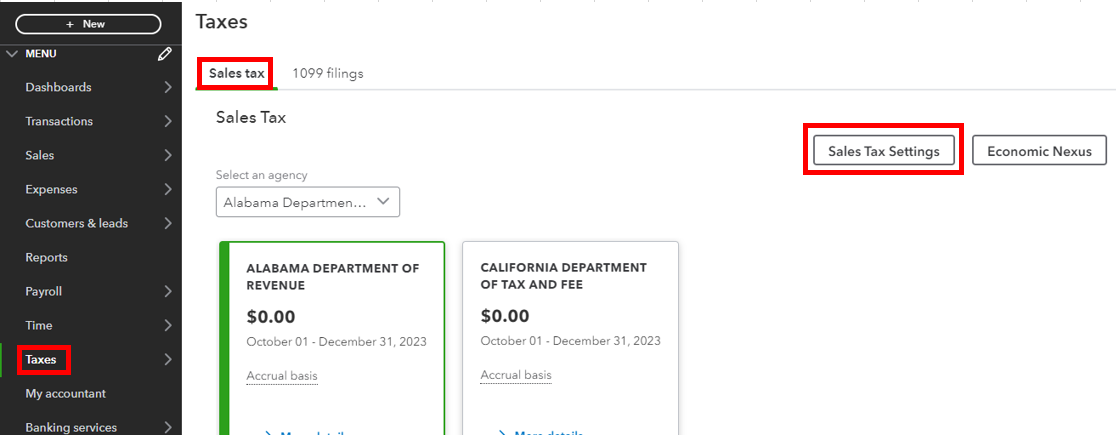
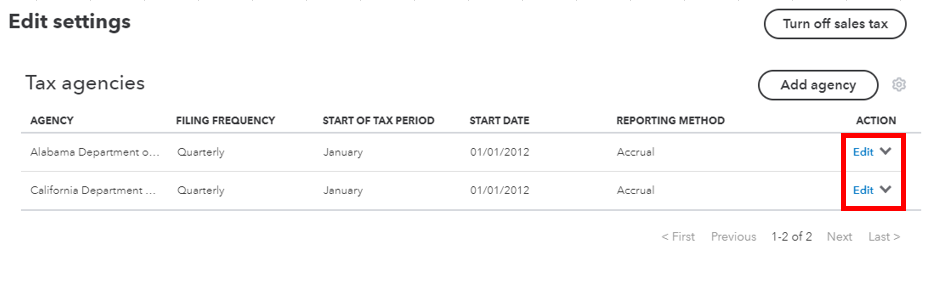
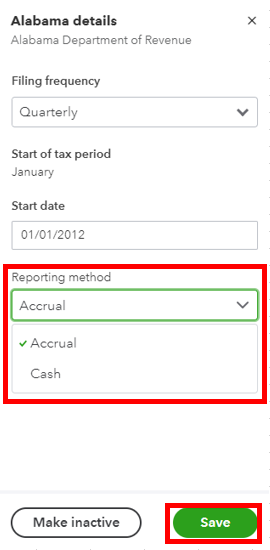
I've collected additional resources about managing sales and taxes:
I'm always around to help if you need further assistance with your sales transactions and taxes in QuickBooks Online. Have a good one, and stay safe!
Sorry, that didn't work, i see where your advice could be helpful though. All my sales tax settings are correct. Nothing has changed. I'm on the phone with QB customer service now. I'll post a reply with whatever solution we come up with.
Sooooo, what happened Im in the same boat. Did QB give you a solution?
Did QB have a solution, IM encountering the same thing
I understand the inconvenience this has caused you, omarsloan. Your concern is totally valid, and we will bring it to the attention of management to improve our customer service.
After conducting a thorough investigation, we have identified that the issue is related to investigation number INV-94048. Please be assured that our engineering team is actively working to resolve this issue, and we anticipate providing you with an update soon.
To stay informed about the progress, I recommend reaching out to our QuickBooks Online Support team and requesting to be added to the list of affected users. This will ensure that you receive timely updates on the issue via email. To contact our support team, please follow these steps:
Additionally, you can refer to this article guide to learn how to correct invoices you created without sales tax in QuickBooks Online (QBO): Correct invoices created without sales tax in QuickBooks Online
Moreover, you can visit this additional resource to check if you can switch to automated sales tax: Set up where you collect sales tax in QuickBooks Online
Thank you for your patience and understanding. If you have any further questions about sales transactions and taxes in QBO, please do not hesitate to let me know. I am always here to help. Best regards.
I have found a workaround.
The way around this is to create it as an estimate until the customer is ready to pay, then convert to an invoice.


You have clicked a link to a site outside of the QuickBooks or ProFile Communities. By clicking "Continue", you will leave the community and be taken to that site instead.
For more information visit our Security Center or to report suspicious websites you can contact us here


