Turn on suggestions
Auto-suggest helps you quickly narrow down your search results by suggesting possible matches as you type.
Showing results for
Get 50% OFF QuickBooks for 3 months*
Buy now

Thank you for bringing up the issue regarding the total items not appearing on your invoice in QuickBooks Self-Employed (QBSE). I'm here to provide some insights how the items shows on your invoice.
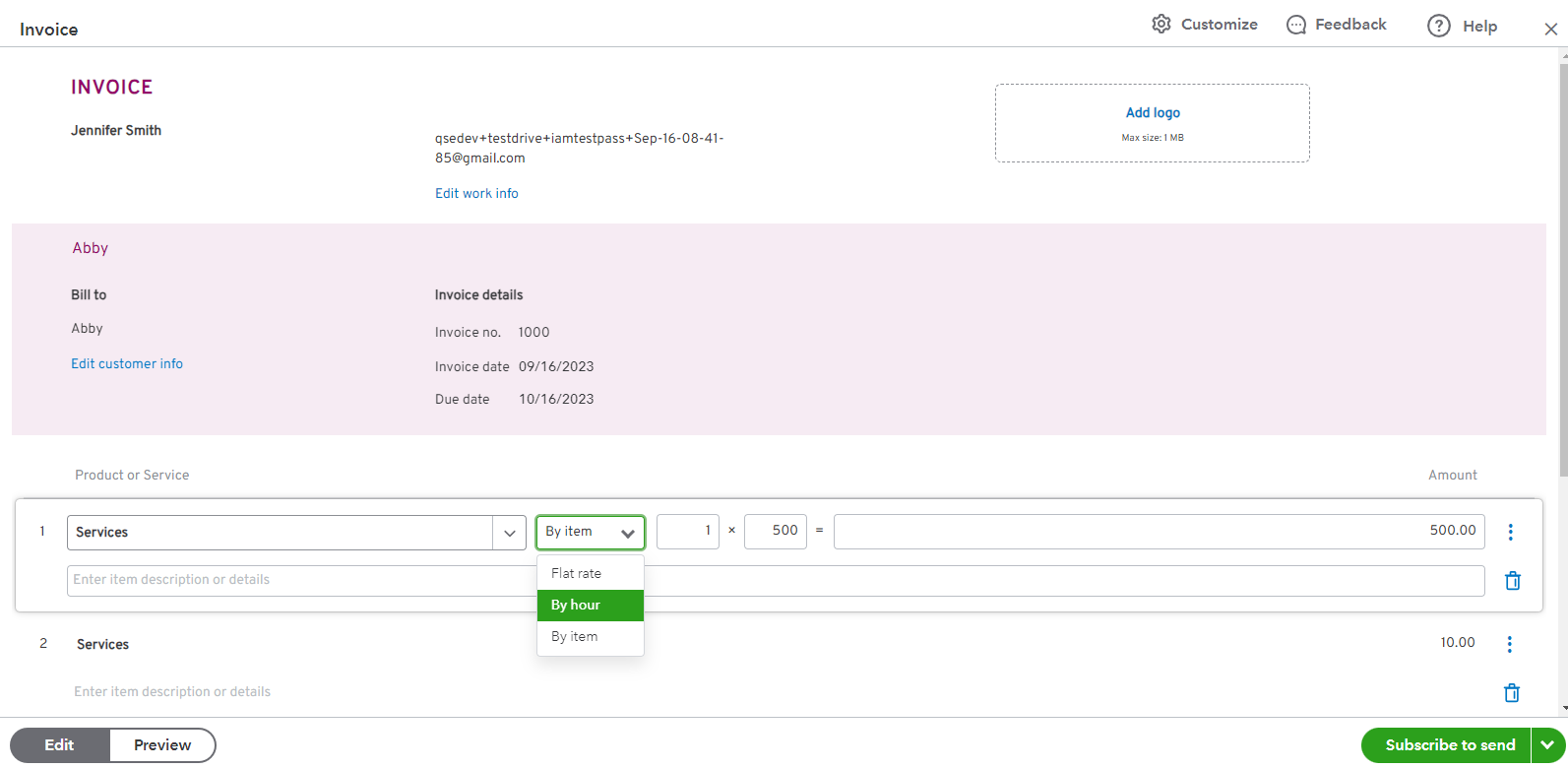
In QBSE, the display of the total items on your invoice depends on the billing method you choose for your products or services. QBSE offers three billing methods: flat rate, per item, and per hour.
If you have selected the flat rate billing method, the total items field may not be displayed on your invoice because the flat rate does not require a quantity to be entered. In this case, the total amount for the item will be calculated based on the flat rate you have set.
On the other hand, if you have chosen the per item or per hour billing method, the total items field should be visible on your invoice. You will need to enter the quantity for each item or the number of hours worked, and QBSE will calculate the total items accordingly.
If you have already selected the appropriate billing method and entered the quantity for your items, but the total items field is still not appearing on your invoice.
See the screenshot below for your visual reference.
Moreover, I'm also adding these articles below to guide you further on how to effectively manage your invoices in QBSE:
In addition, you can also categorize transactions to organize your income and expenses in QuickBooks Self-Employed. Please check out this article for your guide: Categorize transactions in QuickBooks Self-Employed.
Feel free to leave a comment below if you have follow-up questions about managing invoices in in QuickBooks Self Employed. I’m always here to help.
This fix did not work. I always use the "per item" box. I never changed my process, but the items are not showing.
We appreciate you getting back here in the thread.
Upon checking here on our system, there's an ongoing investigation about missing by item, by hour, inside the invoice in QuickBooks Self-Employed (QBSE). We can see the urgency of this matter and know that our engineers are already working on a possible fix to address this issue. We'd recommend contacting our Customer Care Team so they can get your details and add you to the list of affected users so you can receive an update once troubleshooting is available. We'll write down the steps to get you going:
See this page for more details: Contact QuickBooks Self-Employed Support.
Additionally, we've got these articles to help you manage invoices, add transactions into your company file, and ensure your data stays accurate inside QBSE:
The Community team has your back if you have other queries related to QuickBooks. Please don't hesitate to visit us or leave a comment below so we can provide assistance and help you resolve your concerns. Stay safe, and have a good one!
I'm having the same issues, but these are strictly due to the terribly designed new "modern" template. To make matters worse, the poor design of the layout (wasted space for a longer invoice), is not very editable. I vastly prefer the legacy template, and have gone back to it, even though I can only preview it in print mode.
I'm a graphic designer, and this invoice is embarrassing to send customers.
OB took something that worked, decided it needed more "features", and broke it.
Is QB planning a better invoice template that will address these issues? Looking for viable workarounds now.
Bear in mind that I don't have the time to read multiple pages of a complex FAQ on doing a simple invoice.
Hi there, kurt.
Transitioning to a new platform can be a daunting task, especially when you have already become accustomed to the previous layout. It can be challenging to navigate the new interface and locate the features and tools that were once easily accessible. Additionally, adapting to any changes in the workflow and processes can add to the complexity and frustration of the transition. However, with some patience and persistence, it is possible to overcome these challenges and become proficient with the new features.
The changes made to the invoice templates could be driven by various factors, such as user feedback, industry trends, or the need to improve the overall functionality of the software. For instance, QuickBooks may make changes to the invoice templates to make them more customizable and easier to use or to add new features that could enhance the user experience.
While some users may find it frustrating that the invoice templates keep changing, it's essential to understand that these changes are often made to improve the software's functionality and user experience. QuickBooks Self-Employed is committed to providing its users with the best possible tools to manage their financials, including regular updates and improvements to the software.
Furthermore, you can check these articles to help you manage invoices, add transactions to your company file, and ensure your data stays accurate inside QBSE:
Feel free to leave a comment below if you need any further assistance regarding layouts in QuickBooks Self-Employed. I'm always here to help you out. Have a wonderful day!
I know that was a cut and paste AI response, and completely missed the point. Sorry.
I am also missing a total. How can it be an invoice without a total?
Hello there, @oxpress.
I can see how the new invoice interface affects your impression when recording your transactions. Let me share information to ensure you can see the total item within your entry.
QuickBooks Self-Employed (QBSE) now has the new invoice layout where you'll use the per-item or per-hour billing method to see the total item. If you're using the flat rate billing method, you wouldn't be able to display the total as you don't have to enter a quantity for it.
On the other hand, you can send your insights and opinions regarding the new invoice layout directly to our product engineers. They might consider your suggestions when working on future product updates.
Here's how:
Moreover, you might want to review this article for guidance on organizing your transactions: Categorize transactions in QuickBooks Self-Employed.
Please don't hesitate to update us in the thread if you have additional questions regarding your invoices or other related concerns in QuickBooks Self-Employed. We're always here to lend a hand.


You have clicked a link to a site outside of the QuickBooks or ProFile Communities. By clicking "Continue", you will leave the community and be taken to that site instead.
For more information visit our Security Center or to report suspicious websites you can contact us here


