Thanks for messaging us, Rose.
QuickBooks relies on your bank to determine the available information for download. Most banks only allow downloads of the last 90 days' worth of transactions, so older transactions won't automatically be included.
For now, you can manually upload the bank transaction from July-December to QuickBooks.
Here's how:
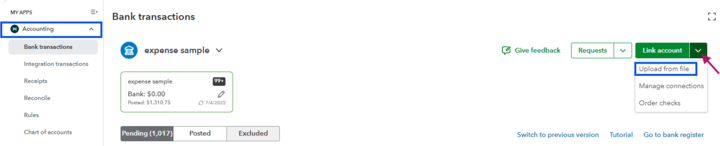
- Go to the Accounting menu and proceed to the Bank transaction page.
- Click on the Link account drop-down menu.
- Select Upload file.
- Choose the correct QuickBooks account where you want to add the transactions.
- Drag or attach the file you downloaded from your computer.
- Follow the instructions on the screen.
If you need help with file formats, check this article: Format CSV files in Excel to get bank transactions into QuickBooks.
Feel free to reach out again if you need assistance.




