We're unable to freeze a column on a budget report in QuickBooks Online (QBO), @IPT725. However, I’m sharing an alternative method to achieve your goal.
While there isn’t a direct way to do this in QBO, you can export your report to Excel. In Excel, you can use features like freezing panes, which will help you analyze your data more effectively.
Here’s how you can export your report:
For Modern View:
- Click on the More actions dropdown.
- Select Export to Excel.

For Classic View:
- Click the Export icon.
- Choose Export to Excel.

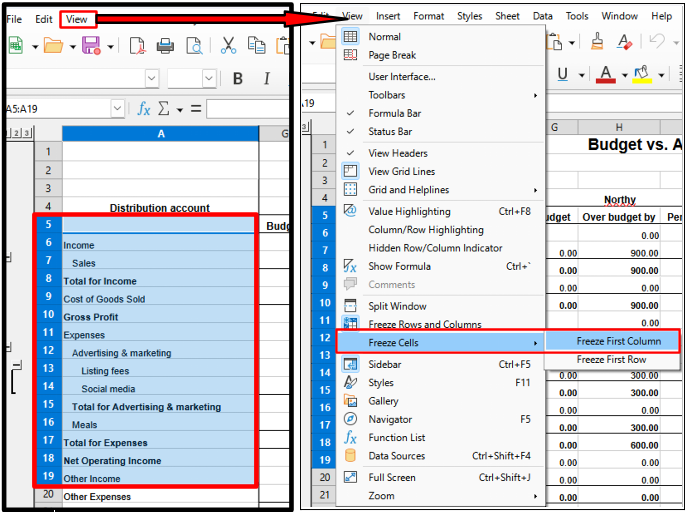
Once the report is exported, follow these steps to freeze the columns in Excel:
- Select the cell you want to keep visible.
- Click on the View tab.
- Click Freeze Cells, then select Freeze Column.
If you want to customize your reports to show the data in the right place, here’s an article for your reference: Customize reports in QuickBooks Online.
Additionally, you can email, print, or save your reports for future use to help you track your business performance seamlessly.
For personalized assistance with your reports or other tasks, consider exploring our QuickBooks Live Expert Assisted.
If you need any further help with transactions in QBO, specifically with managing your reports, please let me know. I’m here to assist you in the Community.




