Turn on suggestions
Auto-suggest helps you quickly narrow down your search results by suggesting possible matches as you type.
Showing results for
Get 50% OFF QuickBooks for 3 months*
Buy nowWe installed the lastest update V34.0DR13 dated 02/21/2025
We are noticing an error on several reports.
We printed an employee report with the following criteria
DATE
NUM
SOURCE NAME
SSN/TAXID
PAYROLL ITEM
AMOUNT CALCULATED AMOUNT.
Everything looks good visually on the screen but when you print the report
The only thing that prints is
Num
date
Source name -is blank
everything else is moved over a column and the amount is not printing at all. It's not on a separate page.
you can change to protrait mode.
Now we put this in excel and you will notice that the source name is move over under ssn/tax id. And everything is moved over a column.

Thanks for letting us know about the trouble you're experiencing when printing out reports with the recent QuickBooks Desktop (QBDT) update, Nicolet31. Our team is dedicated to swiftly resolving this matter so you can generate accurate data and get back to what you do best!
For personalized help and swift resolution, I recommend reaching out directly to our support team. They'll gather some additional information from you and provide clear guidance on the next steps to take. To connect with them, follow these steps:
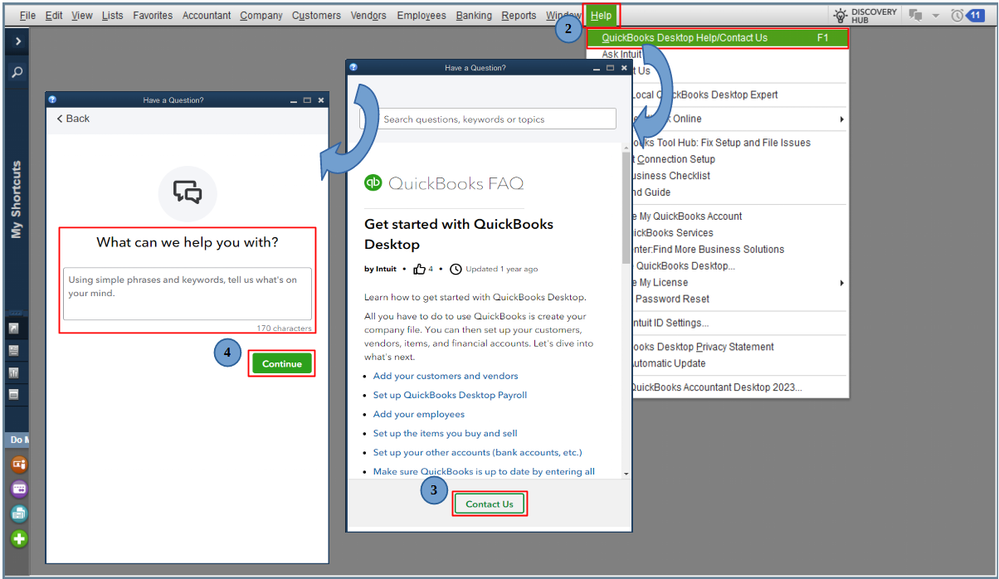
Additionally, are you looking to combine financial reports from several QuickBooks Desktop company files? If that's the case, I have a helpful article to guide you through the process: Merge reports from multiple company files.
I appreciate your patience as we work to address this, Nicolet31. If there are any additional questions or you need further clarification about printing reports, please don’t hesitate to click the Reply button. I’m always here to help. Take care!
@Rea_M RE: For personalized help and swift resolution, I recommend reaching out directly to our support team.
What? That's nonsense. Support cannot provide "personalized help and swift resolution" for a (rather horrible) program bug.
Only the development team can do that, by fixing the bug. You should know that. We do.


You have clicked a link to a site outside of the QuickBooks or ProFile Communities. By clicking "Continue", you will leave the community and be taken to that site instead.
For more information visit our Security Center or to report suspicious websites you can contact us here


