Turn on suggestions
Auto-suggest helps you quickly narrow down your search results by suggesting possible matches as you type.
Showing results for
Get 50% OFF QuickBooks for 3 months*
Buy now
Thanks for reaching out, @BojanD.
It sounds like you may have some issues with the excel spreadsheet before importing the data into QuickBooks Online. You'll want to ensure you have the following ready:
Here's an example of what your spreadsheet should look like:
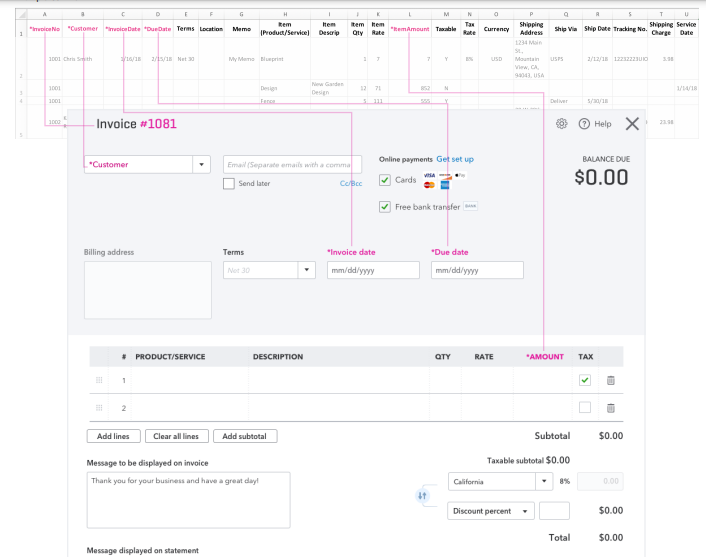
I recommend double-checking your spreadsheet and ensuring each column is set correctly. You can review additional details about this process in Import multiple invoices.
Please let me know if you have any questions or concerns. Take care!
Thank you Tori B for your respond,
But the problem is something different, Excel file is OK, it's uploaded OK with everything that I write in the columns (Invoice number, Customer, Invoice date, Due date, Item(Product/Service), Item Description, Item Quantity, Item Rate and Item Amount).
QB created OK the invoices with every information from the excel columns (I have 67 invoice, from which 4 were with two Items - and they were imported and created OK). QB pull the information from Customer section in QB like address, shipping address, name of the customer OK.
But previously I have entered additional information in the costumer field - in the customer section in QB (picture below). And the problem is when I created manually invoices those information from the custom fields are automatically filled in the invoice (I just write the customer name and those additional field are automatically written, just like the information for the address and the shipping address), but when I create invoices imported from the Excel file those information are not automatically field out, only the address and the shipping address are automatically filed out, but the custom fields they are left blank in the invoice (when I open to see the invoice in QB, before printing).
I am using QB Online Advance.
Thank you.


You have clicked a link to a site outside of the QuickBooks or ProFile Communities. By clicking "Continue", you will leave the community and be taken to that site instead.
For more information visit our Security Center or to report suspicious websites you can contact us here


